SKU: OT5864 Αριθμός είδους: XR357 EAN: 8720828223901

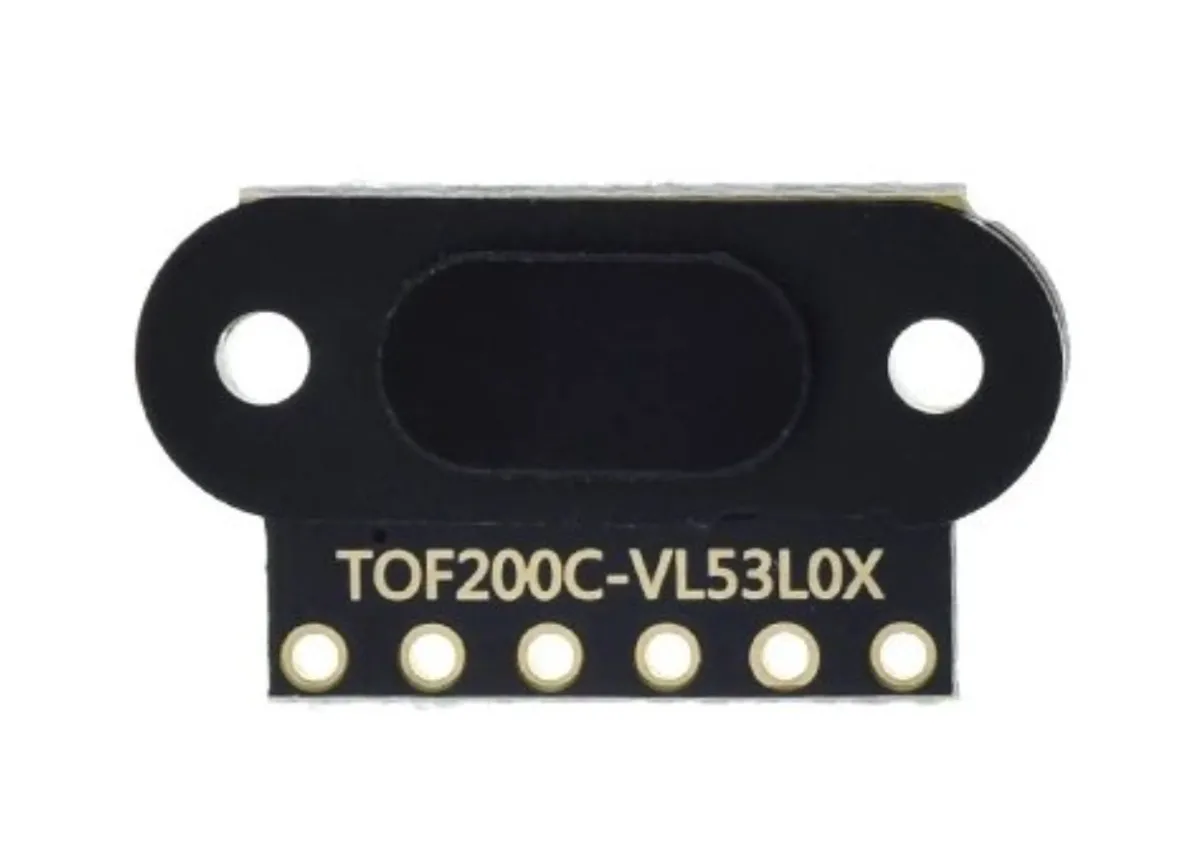
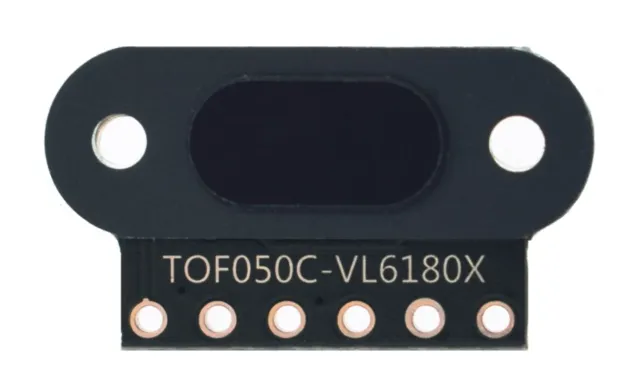
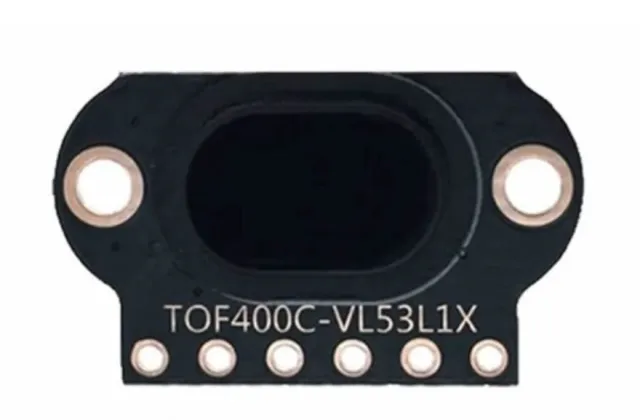
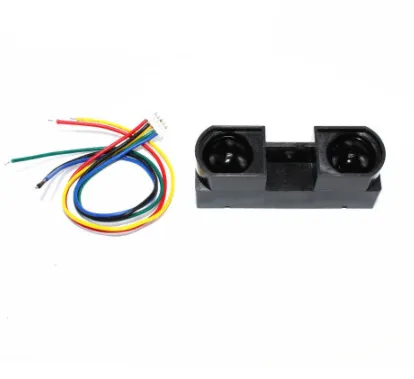
Μίνι module αισθητήρα απόστασης λέιζερ με ακρίβεια 1mm και μεγάλο εύρος.
Model: TOF200C VL53L0X
Spanning: 3V tot 5 V
Stroomverbruik: 40 mA (max)
Afstand: 3cm tot 200cm
Aansluitingen:
- VIN
- GND
- SDA
- SCL
- INT
- SHUT
Communicatie: το πρωτόκολλο επικοινωνίας I2C (πλήρως συμβατό με σύστημα 3-5 v)
Κατάλληλο για Arduino, ESP8266 και ESP32. Λειτουργεί καλά με τη βιβλιοθήκη Adafruit_VL6180X.
Πολλαπλοί αισθητήρες σε 1 γραμμή I2C είναι δυνατοί, επειδή οι αισθητήρες μπορούν να λάβουν μέσω λογισμικού μια διεύθυνση I2C.
Ο αισθητήρας λέιζερ VL53L0X Time Of Flight είναι ένας εξαιρετικά ακριβής και αξιόπιστος αισθητήρας που μπορεί να χρησιμοποιηθεί για ένα ευρύ φάσμα εφαρμογών, όπως μέτρηση απόστασης, ανίχνευση κίνησης και πλοήγηση.
Ένα από τα σημαντικότερα πλεονεκτήματα αυτού του αισθητήρα είναι η ακρίβειά του. Ο αισθητήρας χρησιμοποιεί τεχνολογία λέιζερ για να μετρήσει την απόσταση έως ένα αντικείμενο, προσφέροντας πολύ πιο ακριβές αποτέλεσμα από έναν υπέρυθρο αισθητήρα, για παράδειγμα. Αυτό καθιστά τον αισθητήρα κατάλληλο, για παράδειγμα, για χρήση σε drones, βιομηχανικό αυτοματισμό και ρομπότ.
Επιπλέον, ο αισθητήρας είναι επίσης πολύ εύκολος στη χρήση. Είναι συμβατός με ένα ευρύ φάσμα πλατφορμών μικροελεγκτών, όπως Arduino, Raspberry Pi και STM32, και υπάρχουν πολλά παραδείγματα και βιβλιοθήκες διαθέσιμα για να σας βοηθήσουν να ενσωματώσετε τον αισθητήρα στο έργο σας.
Τέλος, ο αισθητήρας είναι επίσης πολύ μικρός και ελαφρύς, γεγονός που τον καθιστά εύκολο να ενσωματωθεί σε ένα ευρύ φάσμα εφαρμογών. Οι 2 οπές βιδών κάνουν επίσης πολύ εύκολη τη σταθερή στερέωση αυτού του αισθητήρα.
Afmetingen
Lengte: 1,3cm
Breedte: 1,04cm
Hoogte: 0,32cm

Με την αναπαραγωγή φορτώνεται το βίντεο από το YouTube.
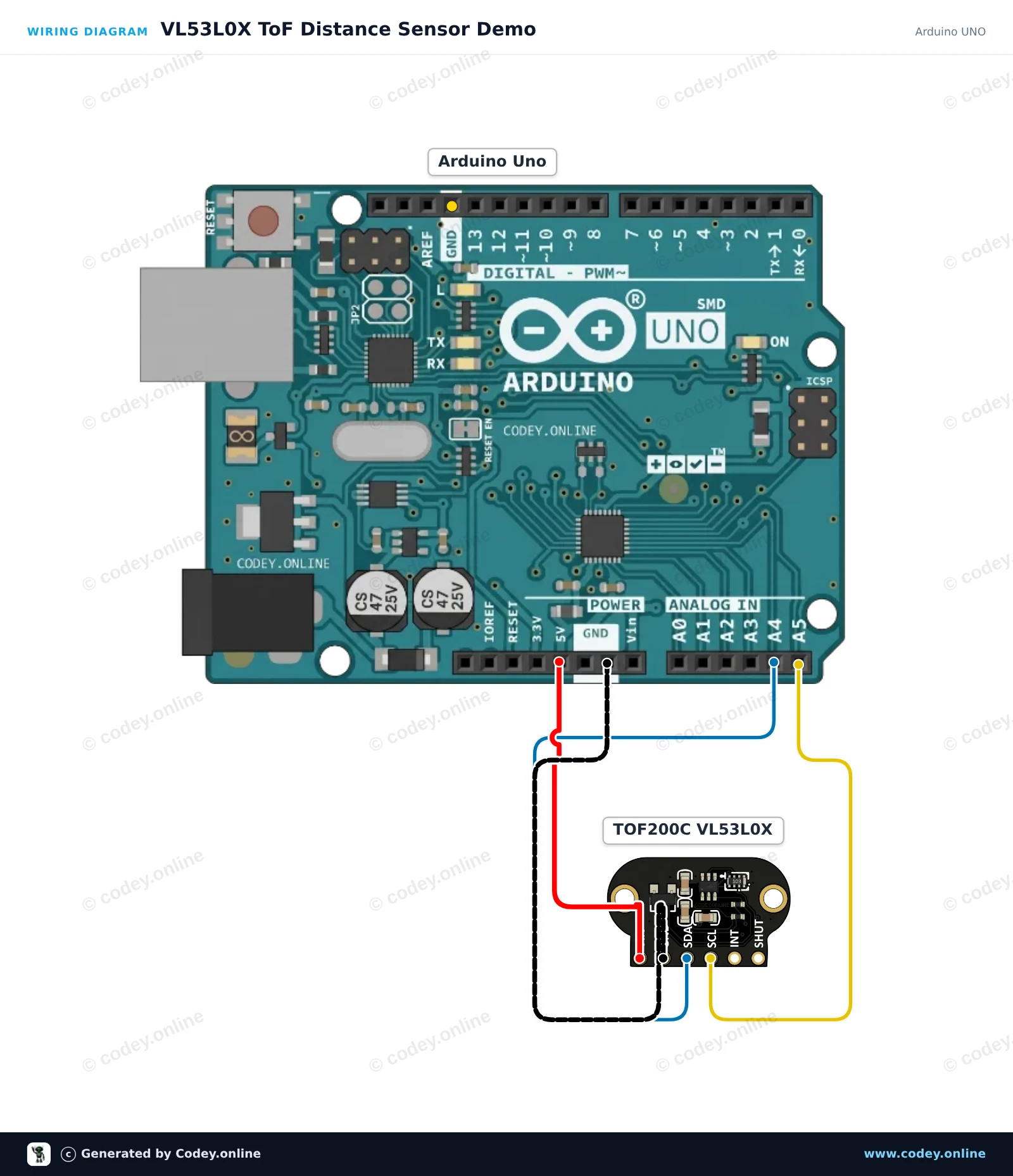
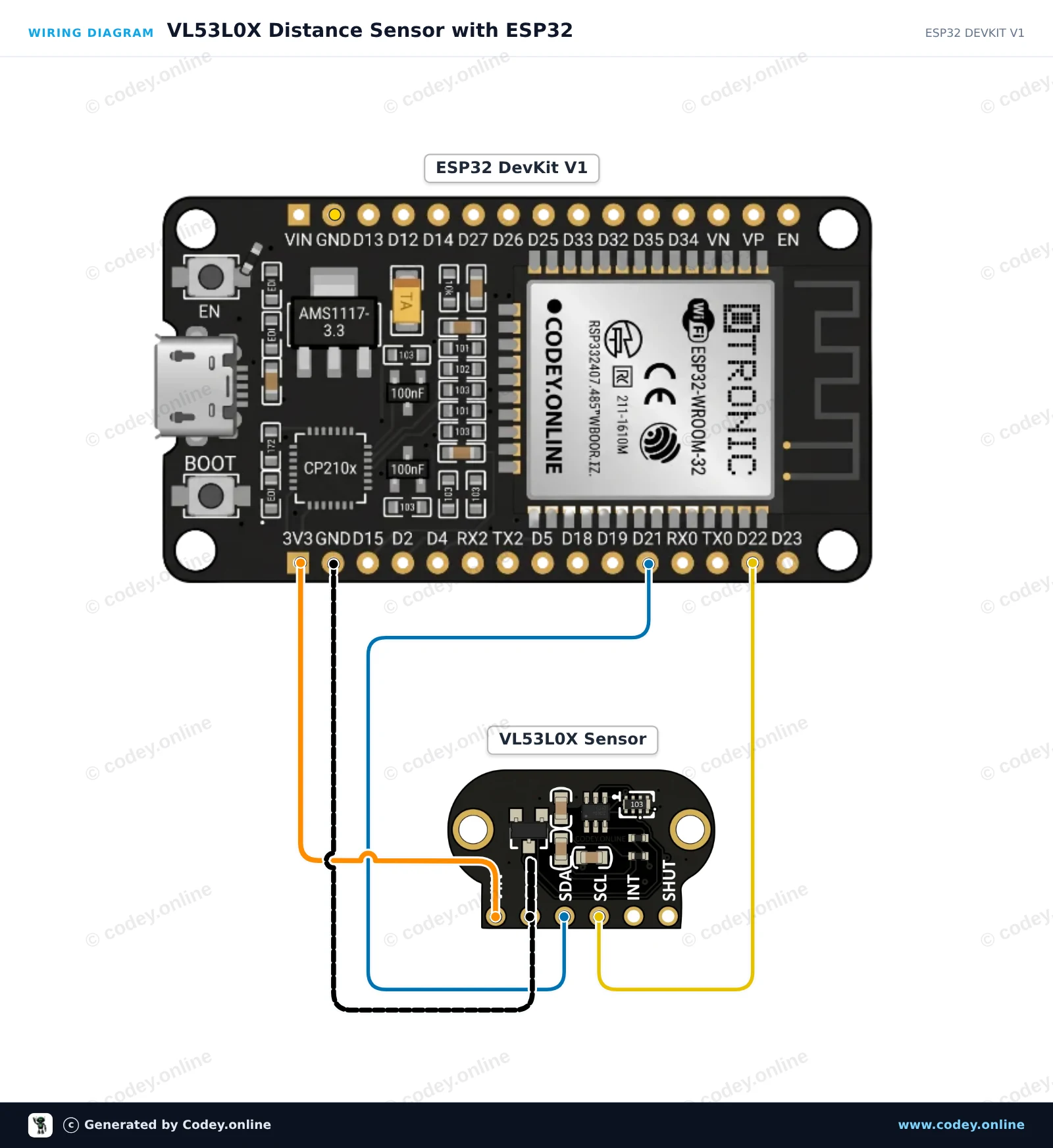
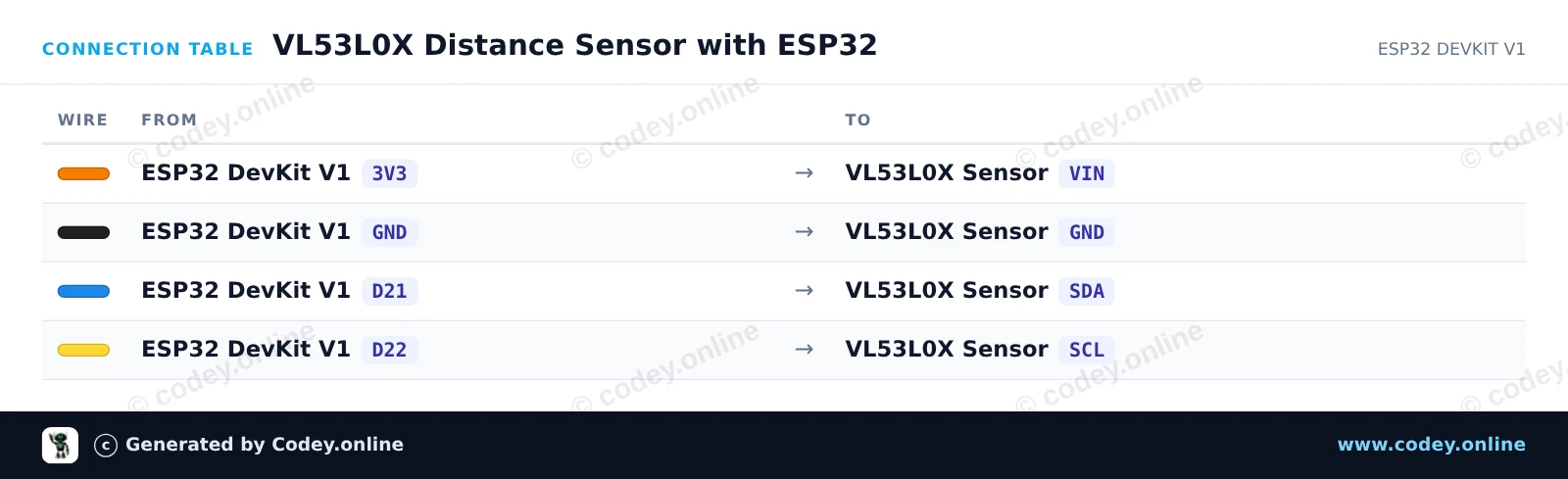
Έτσι συνδέεις το TOF200C VL53L0X Αισθητήρας απόστασης Time-Of-Flight πολύ ακριβής σε ένα Arduino UNO ή ESP32, με ένα παράδειγμα sketch που μπορείς να ανεβάσεις αμέσως.
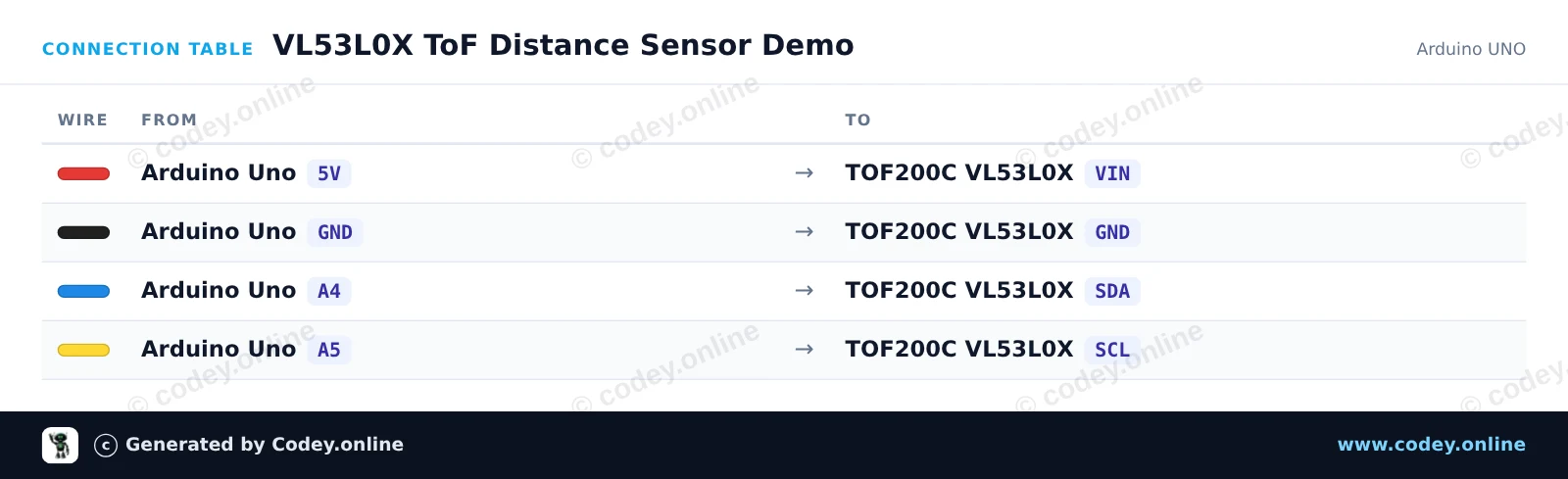
Αυτό το project δείχνει μετρήσεις απόστασης σε πραγματικό χρόνο με τον αισθητήρα Time-of-Flight VL53L0X, συνδεδεμένο μέσω I2C. Το Arduino Uno διαβάζει δεδομένα απόστασης σε χιλιοστά από τον αισθητήρα και τα εμφανίζει στο Serial Monitor κάθε 200 ms.
/*
 * ==================================================================
 *  Generated by Codey.online  —  https://www.codey.online
 * ==================================================================
 *  Project   : VL53L0X ToF Distance Sensor Demo
 *  Board     : Arduino UNO (arduino:avr:uno)
 *  Parts     : TOF200C VL53L0X Distance Sensor Time-Of-Flight high precision
 *  Libraries : Adafruit_VL53L0X 1.2.5
 *
 *  Codey Online is an AI-powered browser IDE for Arduino and ESP32.
 *  Describe your project and Codey writes the code, draws the wiring
 *  diagram and uploads it to your board, straight from the browser.
 *  This code is free to use, modify and share, without warranty.
 * ==================================================================
 */

#include <Wire.h>
#include <Adafruit_VL53L0X.h>

Adafruit_VL53L0X lox = Adafruit_VL53L0X();

void setup() {
  Serial.begin(115200);
  while (!Serial) {
    delay(1);
  }

  Serial.println(F("VL53L0X Distance Sensor Test"));

  if (!lox.begin()) {
    Serial.println(F("Failed to initialize VL53L0X sensor! Check wiring."));
    while (1) {
      delay(10);
    }
  }

  Serial.println(F("Sensor initialized successfully. Reading distance..."));
}

void loop() {
  VL53L0X_RangingMeasurementData_t measure;

  lox.rangingTest(&measure, false); // Pass true to enable debug output

  if (measure.RangeStatus != 4) { // Phase failures are status 4
    Serial.print(F("Distance: "));
    Serial.print(measure.RangeMilliMeter);
    Serial.println(F(" mm"));
  } else {
    Serial.println(F("Target out of range"));
  }

  delay(200);
}Απαραίτητες βιβλιοθήκες: Adafruit_VL53L0X 1.2.5
Wiring diagram and example code generated by Codey.online — https://www.codey.online
Αυτό το έργο μετρά απόσταση σε χιλιοστά χρησιμοποιώντας τον αισθητήρα Time-of-Flight VL53L0X που είναι συνδεδεμένος μέσω I2C. Ανοίξτε το Serial Monitor στα 115200 baud για να δείτε τις μετρήσεις απόστασης σε πραγματικό χρόνο.
/*
 * ==================================================================
 *  Generated by Codey.online  —  https://www.codey.online
 * ==================================================================
 *  Project   : VL53L0X Distance Sensor with ESP32
 *  Board     : ESP32 DEVKIT V1 (esp32:esp32:esp32doit-devkit-v1)
 *  Parts     : TOF200C VL53L0X Distance Sensor Time-Of-Flight high precision
 *  Libraries : Adafruit_VL53L0X 1.2.5
 *
 *  Codey Online is an AI-powered browser IDE for Arduino and ESP32.
 *  Describe your project and Codey writes the code, draws the wiring
 *  diagram and uploads it to your board, straight from the browser.
 *  This code is free to use, modify and share, without warranty.
 * ==================================================================
 */

#include <Wire.h>
#include "Adafruit_VL53L0X.h"

Adafruit_VL53L0X lox = Adafruit_VL53L0X();

void setup() {
  Serial.begin(115200);
  while (!Serial) { delay(1); }

  Serial.println("VL53L0X Distance Sensor Test");

  // Initialize I2C communication (ESP32 default: SDA=21, SCL=22)
  Wire.begin(21, 22);

  if (!lox.begin()) {
    Serial.println(F("Failed to boot VL53L0X. Check wiring!"));
    while (1);
  }

  Serial.println(F("Sensor initialized successfully."));
}

void loop() {
  VL53L0X_RangingMeasurementData_t measure;

  lox.rangingTest(&measure, false); // Pass true to get debug data printout

  if (measure.RangeStatus != 4) {  // Phase failures have status 4
    Serial.print("Distance (mm): ");
    Serial.println(measure.RangeMilliMeter);
  } else {
    Serial.println("Out of range");
  }

  delay(250);
}Απαραίτητες βιβλιοθήκες: Adafruit_VL53L0X 1.2.5
Wiring diagram and example code generated by Codey.online — https://www.codey.online





 English
  Nederlands
  Frans
Frans  Deutsch
  Italiano
  Español
  Suomi
Suomi  Polski
  Dansk
Dansk  Български
  Čeština
  Hrvatski
  Svenska
  Aileen