SKU: OT2371-B13 Αριθμός είδους: NA330 EAN: 8321317104642

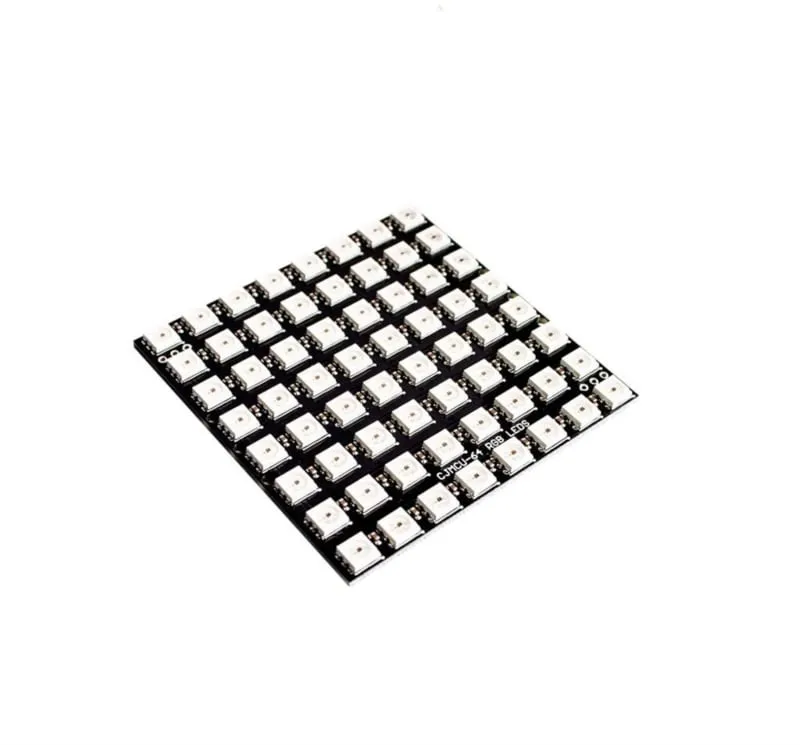
RGB LED Matrix με 64 διευθυνσιοδοτούμενα LEDs WS2812b.
Λειτουργεί στα 5V και μπορεί να ελεγχθεί μέσω Arduino, ESP8266 και ESP32.
Διαστάσεις
Μήκος: 6,5cm
Πλάτος: 6,5cm
Ύψος: 0,3cm
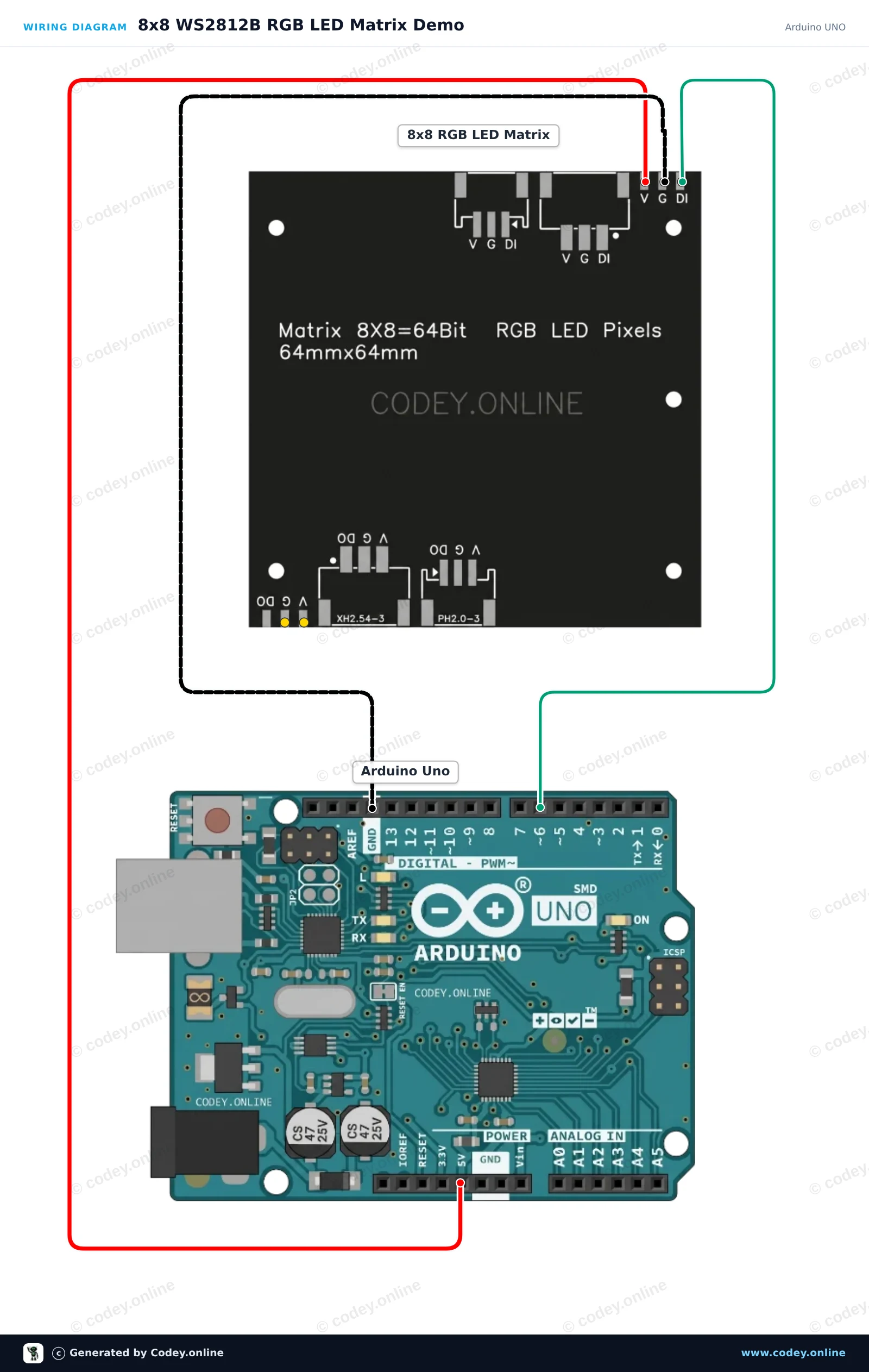
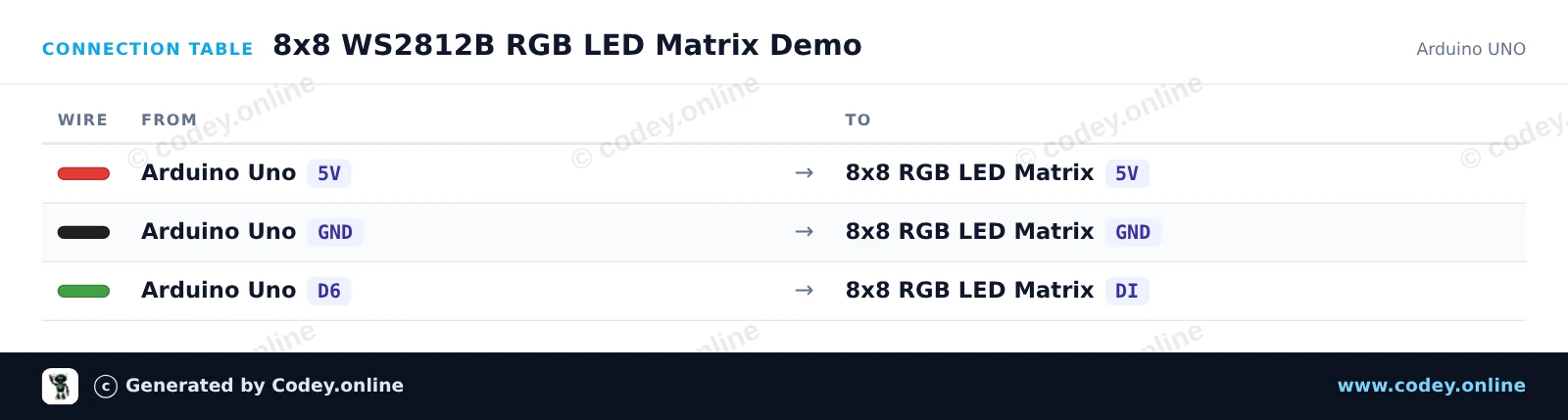
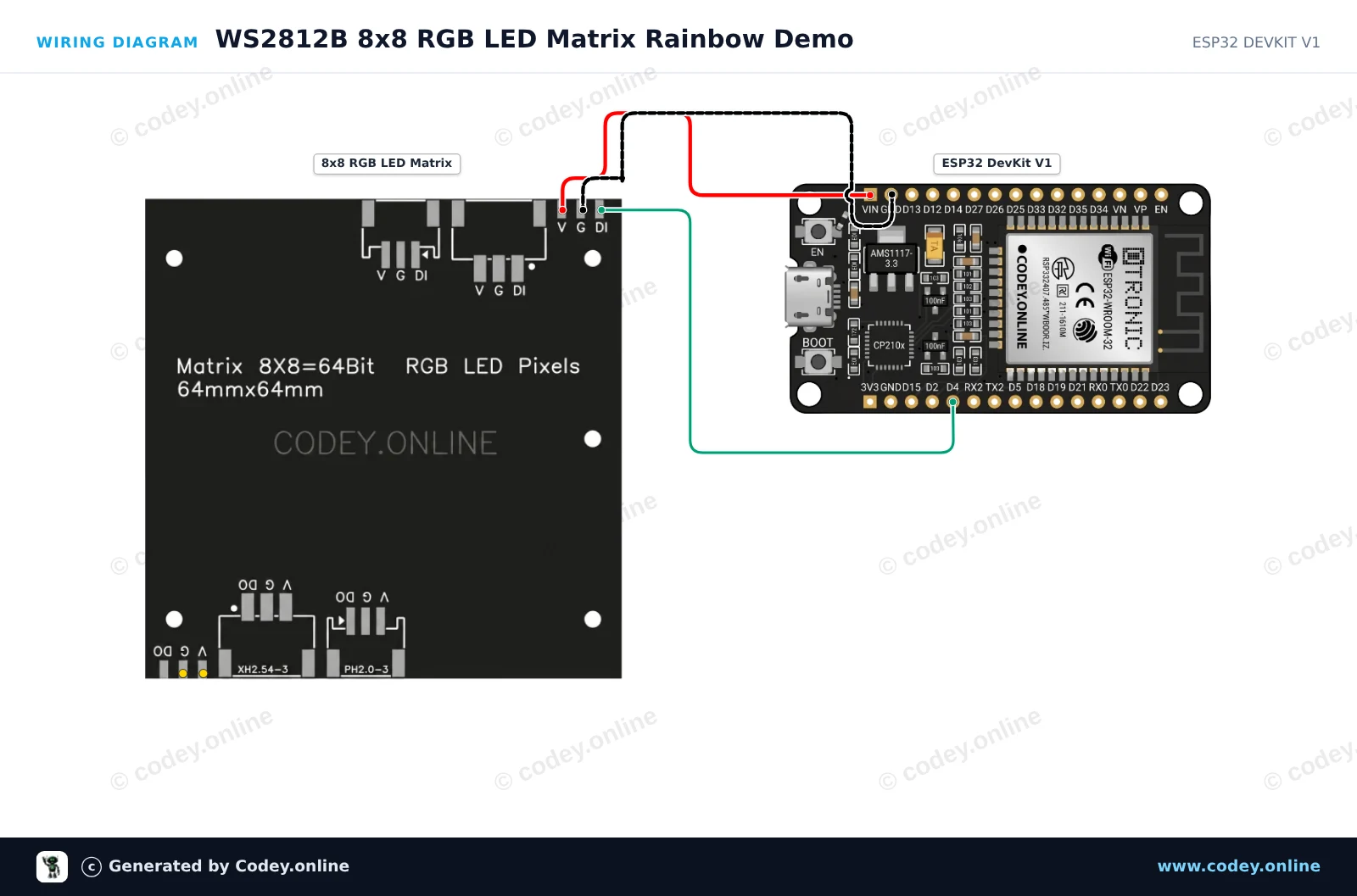
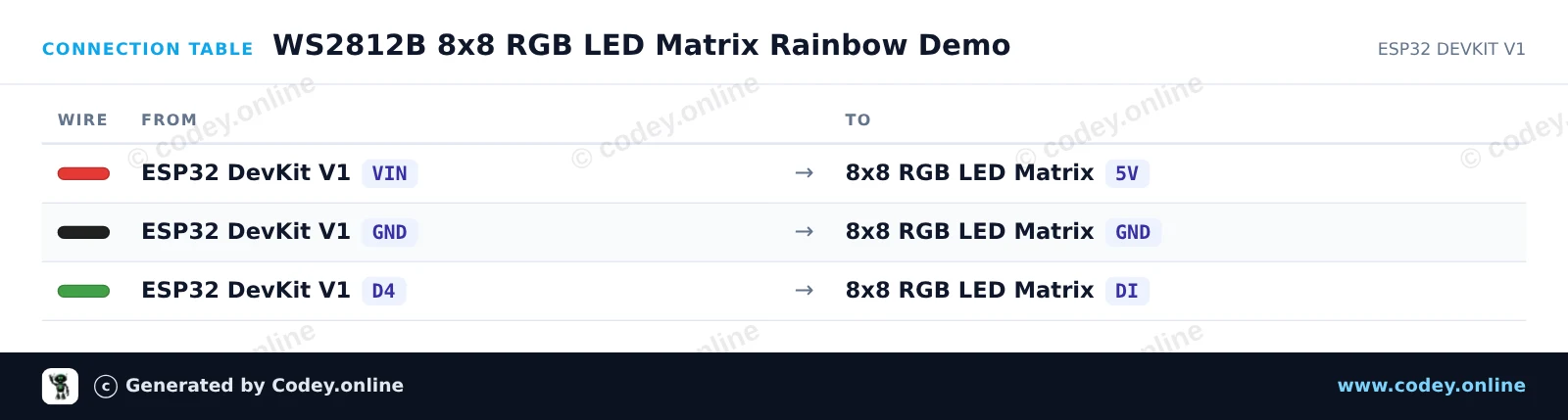
Έτσι συνδέεις το 8x8 RGB 64 LED Matrix 5V WS2812b σε ένα Arduino UNO ή ESP32, με ένα παράδειγμα sketch που μπορείς να ανεβάσεις αμέσως.
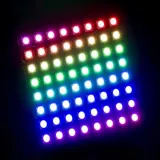
Αυτό το project παρουσιάζει μια διευθυνσιοδοτούμενη μήτρα LED RGB WS2812B 8x8 συνδεδεμένη απευθείας σε ένα Arduino Uno. Το sketch αρχικοποιεί τα 64 LEDs και εμφανίζει ένα περιστρεφόμενο μοτίβο χρωμάτων πάνω στη μήτρα σε ασφαλές επίπεδο φωτεινότητας. Συνδέστε τα pins 5V, GND και DI όπως φαίνεται για να δοκιμάσετε τη μήτρα σας μέσα σε λίγα λεπτά.
/*
 * ==================================================================
 *  Generated by Codey.online  —  https://www.codey.online
 * ==================================================================
 *  Project   : 8x8 WS2812B RGB LED Matrix Demo
 *  Board     : Arduino UNO (arduino:avr:uno)
 *  Parts     : 8x8 RGB 64 LED Matrix 5V WS2812b
 *  Libraries : Adafruit NeoPixel 1.15.5
 *
 *  Codey Online is an AI-powered browser IDE for Arduino and ESP32.
 *  Describe your project and Codey writes the code, draws the wiring
 *  diagram and uploads it to your board, straight from the browser.
 *  This code is free to use, modify and share, without warranty.
 * ==================================================================
 */

#include <Adafruit_NeoPixel.h>

#define LED_PIN   6
#define LED_COUNT 64

Adafruit_NeoPixel matrix(LED_COUNT, LED_PIN, NEO_GRB + NEO_KHZ800);

// Converts (x, y) coordinates to pixel index (serpentine layout)
uint16_t getPixelIndex(uint8_t x, uint8_t y) {
  if (y % 2 == 0) {
    return y * 8 + x;
  } else {
    return y * 8 + (7 - x);
  }
}

void setup() {
  Serial.begin(115200);
  matrix.begin();
  matrix.setBrightness(30); // Keep brightness low when powered from Arduino 5V
  matrix.show();            // Turn off all pixels
  Serial.println(F("WS2812B 8x8 LED Matrix ready!"));
}

void loop() {
  static uint16_t hueOffset = 0;

  for (uint8_t y = 0; y < 8; y++) {
    for (uint8_t x = 0; x < 8; x++) {
      uint16_t pixelHue = hueOffset + ((x + y) * 65536L / 16);
      uint32_t color = matrix.gamma32(matrix.ColorHSV(pixelHue));
      matrix.setPixelColor(getPixelIndex(x, y), color);
    }
  }

  matrix.show();
  hueOffset += 500;
  delay(20);
}Απαραίτητες βιβλιοθήκες: Adafruit NeoPixel 1.15.5
Wiring diagram and example code generated by Codey.online — https://www.codey.online
Αυτό το έργο οδηγεί μια μήτρα LED RGB WS2812B 8x8 χρησιμοποιώντας ένα ESP32. Κάνει κύκλο με πολύχρωμα μοτίβα ουράνιου τόξου σε όλα τα 64 LED με ατομική διευθυνσιοδότηση. Η φωτεινότητα έχει ρυθμιστεί χαμηλά για να εξασφαλίζεται ασφαλής λειτουργία απευθείας μέσω τροφοδοσίας USB.
/*
 * ==================================================================
 *  Generated by Codey.online  —  https://www.codey.online
 * ==================================================================
 *  Project   : WS2812B 8x8 RGB LED Matrix Rainbow Demo
 *  Board     : ESP32 DEVKIT V1 (esp32:esp32:esp32doit-devkit-v1)
 *  Parts     : 8x8 RGB 64 LED Matrix 5V WS2812b
 *  Libraries : Adafruit NeoPixel 1.15.5
 *
 *  Codey Online is an AI-powered browser IDE for Arduino and ESP32.
 *  Describe your project and Codey writes the code, draws the wiring
 *  diagram and uploads it to your board, straight from the browser.
 *  This code is free to use, modify and share, without warranty.
 * ==================================================================
 */

#include <Adafruit_NeoPixel.h>

#define LED_PIN    4
#define LED_COUNT  64
#define BRIGHTNESS 30

Adafruit_NeoPixel matrix(LED_COUNT, LED_PIN, NEO_GRB + NEO_KHZ800);

void setup() {
  Serial.begin(115200);
  matrix.begin();
  matrix.setBrightness(BRIGHTNESS);
  matrix.show();
  Serial.println("WS2812B 8x8 Matrix Initialized");
}

void loop() {
  // Rainbow cycle across the matrix
  for (long firstPixelHue = 0; firstPixelHue < 5 * 65536; firstPixelHue += 256) {
    for (int i = 0; i < matrix.numPixels(); i++) {
      int pixelHue = firstPixelHue + (i * 65536L / matrix.numPixels());
      matrix.setPixelColor(i, matrix.gamma32(matrix.ColorHSV(pixelHue)));
    }
    matrix.show();
    delay(15);
  }
}Απαραίτητες βιβλιοθήκες: Adafruit NeoPixel 1.15.5
Wiring diagram and example code generated by Codey.online — https://www.codey.online






 English
  Nederlands
  Frans
Frans  Deutsch
  Italiano
  Español
  Suomi
Suomi  Polski
  Dansk
Dansk  Български
  Čeština
  Hrvatski
  Svenska
  Aileen