SKU: OT2071-D125 Αριθμός είδους: AB012 EAN: 4308851007787

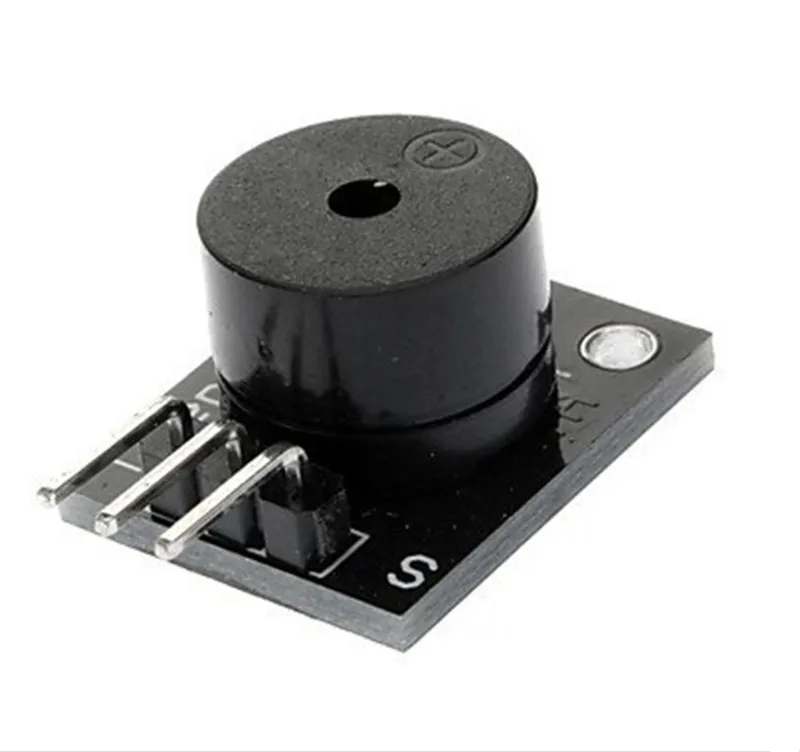
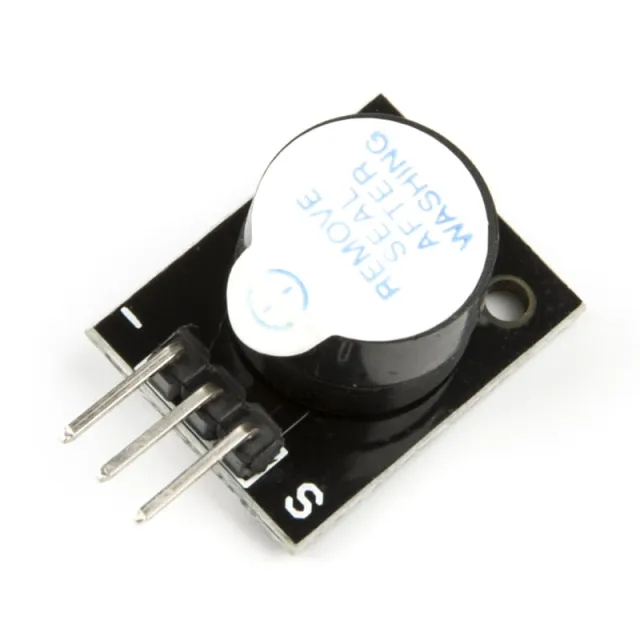
Αυτός ο παθητικός buzzer δίνει έναν τόνο περίπου 85db όταν συνδεθεί σε τάση μεταξύ 4V και 8V. Για αυτόν τον παθητικό buzzer απαιτείται μικροελεγκτής ώστε να παράγει ήχο μέσω σήματος PWM. Ο buzzer καταναλώνει περίπου 30mA.
Voltage: 5V
Geschikt voor o.a. Arduino
Διαστάσεις
Μήκος: 2,5cm
Πλάτος: 1,5cm
Ύψος: 1,1cm
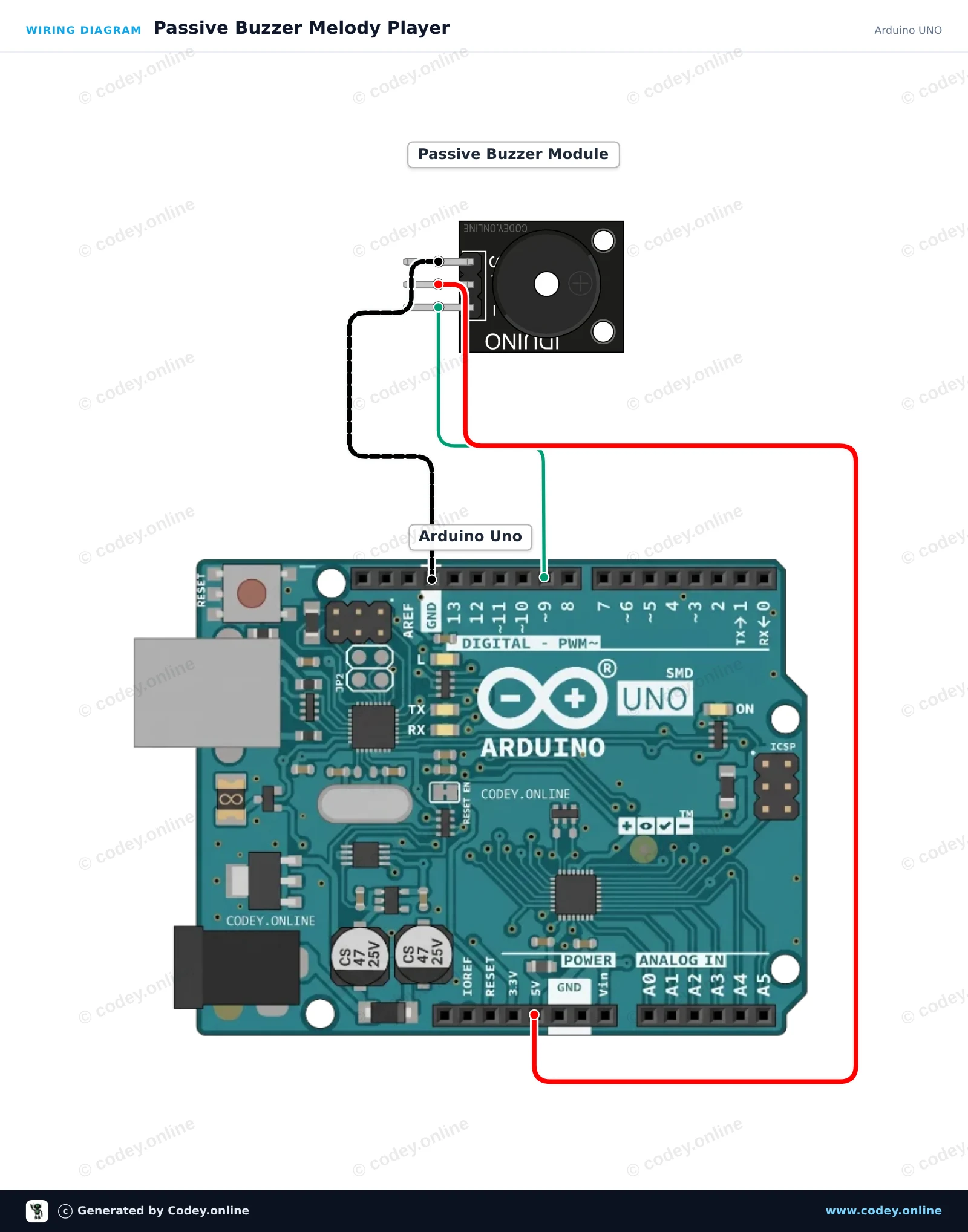
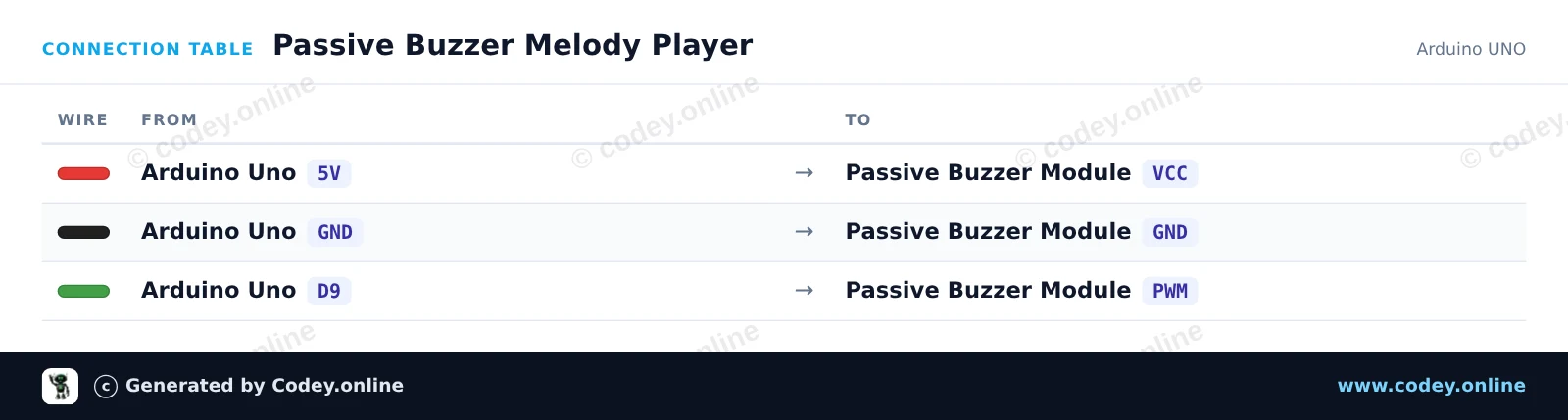
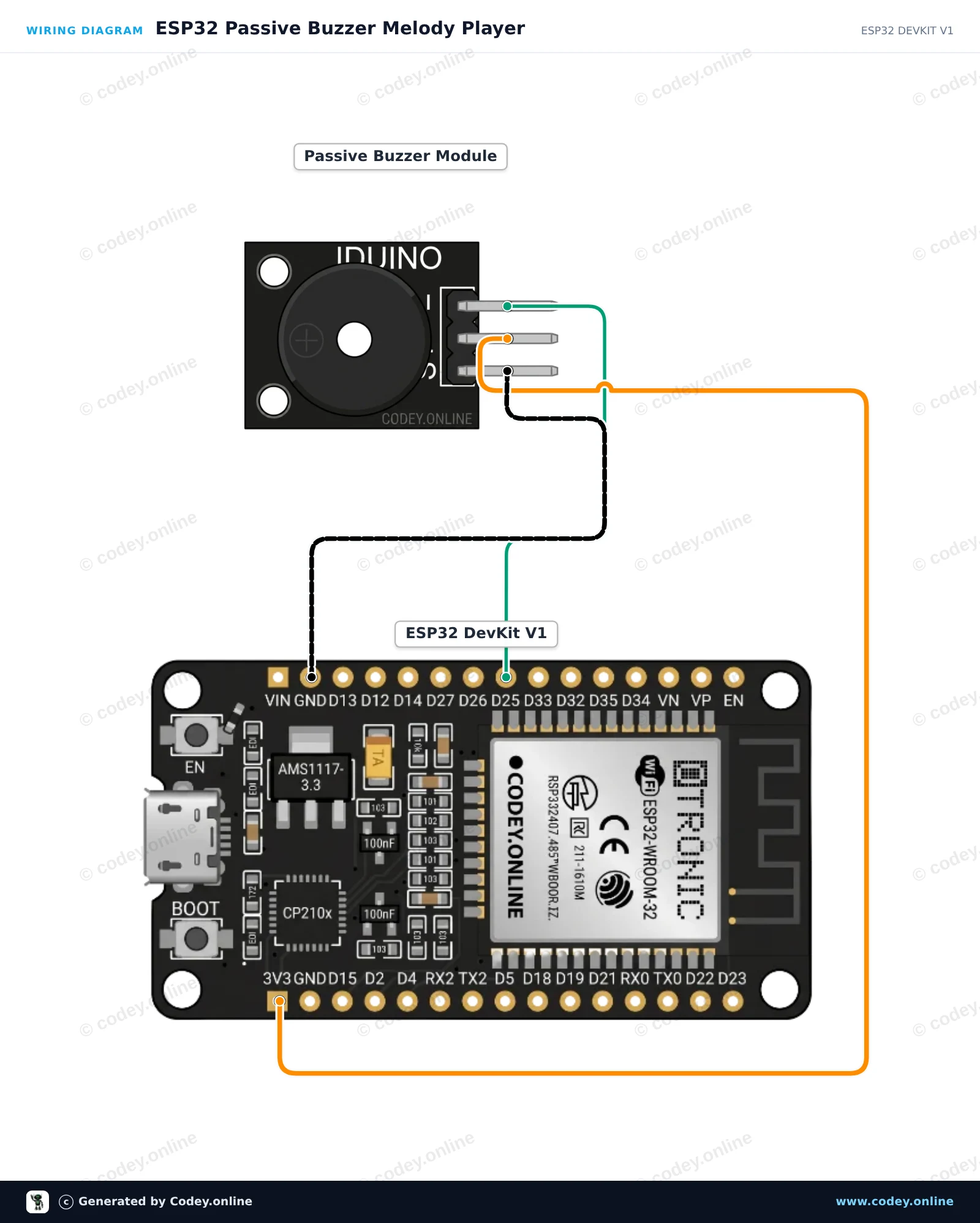
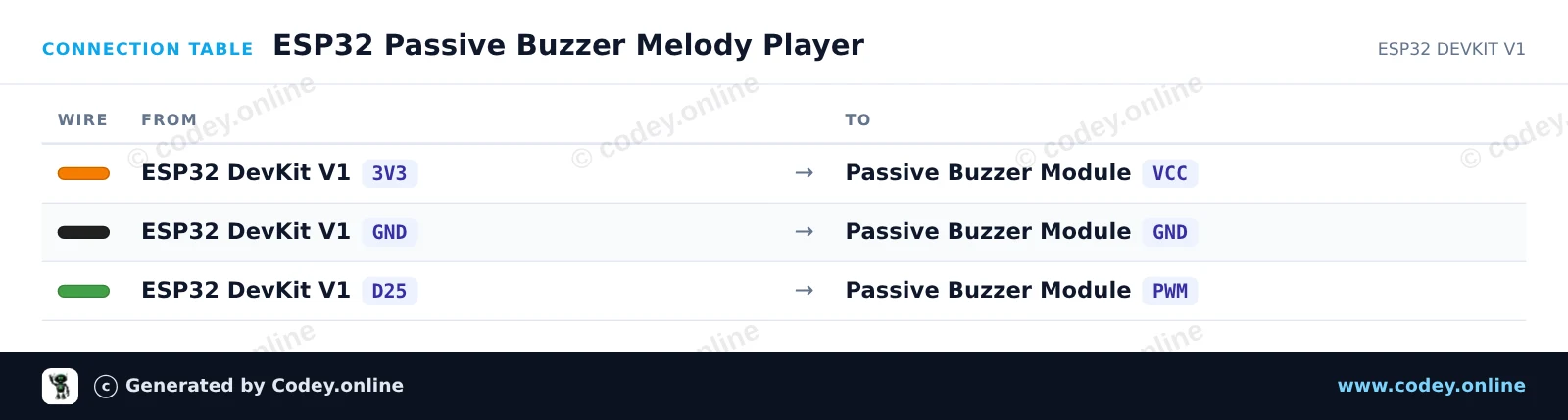
Έτσι συνδέεις το Μονάδα παθητικού buzzer για Arduino σε ένα Arduino UNO ή ESP32, με ένα παράδειγμα sketch που μπορείς να ανεβάσεις αμέσως.
Αυτό το έργο δείχνει πώς να δημιουργείτε μουσικούς τόνους με ένα παθητικό buzzer module χρησιμοποιώντας ένα Arduino Uno. Το Arduino εκπέμπει σήματα μεταβλητής συχνότητας μέσω της λειτουργίας tone() για να παίξει μια μουσική κλίμακα. Ανοίξτε το Serial Monitor στα 115200 baud για να δείτε τις συχνότητες που παίζονται αυτή τη στιγμή.
/*
 * ==================================================================
 *  Generated by Codey.online  —  https://www.codey.online
 * ==================================================================
 *  Project   : Passive Buzzer Melody Player
 *  Board     : Arduino UNO (arduino:avr:uno)
 *  Parts     : Buzzer module passief Arduino
 *  Libraries : none (built-in)
 *
 *  Codey Online is an AI-powered browser IDE for Arduino and ESP32.
 *  Describe your project and Codey writes the code, draws the wiring
 *  diagram and uploads it to your board, straight from the browser.
 *  This code is free to use, modify and share, without warranty.
 * ==================================================================
 */

// Passive Buzzer Module Demo on Arduino Uno
const int BUZZER_PIN = 9;

// Musical notes in Hertz (C major scale: C4 to C5)
const int notes[] = {262, 294, 330, 349, 392, 440, 494, 523};
const int noteCount = sizeof(notes) / sizeof(notes[0]);

void setup() {
  Serial.begin(115200);
  Serial.println(F("Passive Buzzer Demo Starting..."));
}

void loop() {
  Serial.println(F("Playing scale ascending..."));
  for (int i = 0; i < noteCount; i++) {
    Serial.print(F("Tone: "));
    Serial.print(notes[i]);
    Serial.println(F(" Hz"));
    tone(BUZZER_PIN, notes[i], 150);
    delay(200);
  }

  delay(300);

  Serial.println(F("Playing scale descending..."));
  for (int i = noteCount - 1; i >= 0; i--) {
    tone(BUZZER_PIN, notes[i], 150);
    delay(200);
  }

  noTone(BUZZER_PIN);
  delay(1500);
}Wiring diagram and example code generated by Codey.online — https://www.codey.online
Αυτό το παράδειγμα δείχνει πώς να δημιουργείτε μουσικούς ήχους με ένα παθητικό buzzer module χρησιμοποιώντας ένα ESP32. Ο μικροελεγκτής χρησιμοποιεί PWM tone generation για να αναπαράγει επανειλημμένα μια ακολουθία μουσικών νοτών. Συνδέστε το buzzer module απευθείας στην τροφοδοσία, στη γείωση και σε ένα GPIO pin για να ακούσετε τη μελωδία.
/*
 * ==================================================================
 *  Generated by Codey.online  —  https://www.codey.online
 * ==================================================================
 *  Project   : ESP32 Passive Buzzer Melody Player
 *  Board     : ESP32 DEVKIT V1 (esp32:esp32:esp32doit-devkit-v1)
 *  Parts     : Buzzer module passief Arduino
 *  Libraries : none (built-in)
 *
 *  Codey Online is an AI-powered browser IDE for Arduino and ESP32.
 *  Describe your project and Codey writes the code, draws the wiring
 *  diagram and uploads it to your board, straight from the browser.
 *  This code is free to use, modify and share, without warranty.
 * ==================================================================
 */

// Pin connected to the passive buzzer's PWM input
const int BUZZER_PIN = 25;

// Frequencies in Hz for a simple arpeggio
const int melody[] = {262, 330, 392, 523};
const int noteDurations[] = {250, 250, 250, 400};

void setup() {
  Serial.begin(115200);
  pinMode(BUZZER_PIN, OUTPUT);
  Serial.println("ESP32 Passive Buzzer Demo Started!");
}

void loop() {
  Serial.println("Playing melody...");

  for (int i = 0; i < 4; i++) {
    tone(BUZZER_PIN, melody[i], noteDurations[i]);
    delay(noteDurations[i] * 1.30); // Pause between notes
    noTone(BUZZER_PIN);
  }

  delay(2000); // Wait 2 seconds before playing again
}Wiring diagram and example code generated by Codey.online — https://www.codey.online






 English
  Nederlands
  Frans
Frans  Deutsch
  Italiano
  Español
  Suomi
Suomi  Polski
  Dansk
Dansk  Български
  Čeština
  Hrvatski
  Svenska
  Aileen