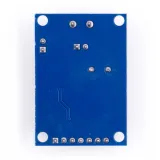
SKU: OT2083-D99 Αριθμός είδους: AA204 EAN: 4374044390615

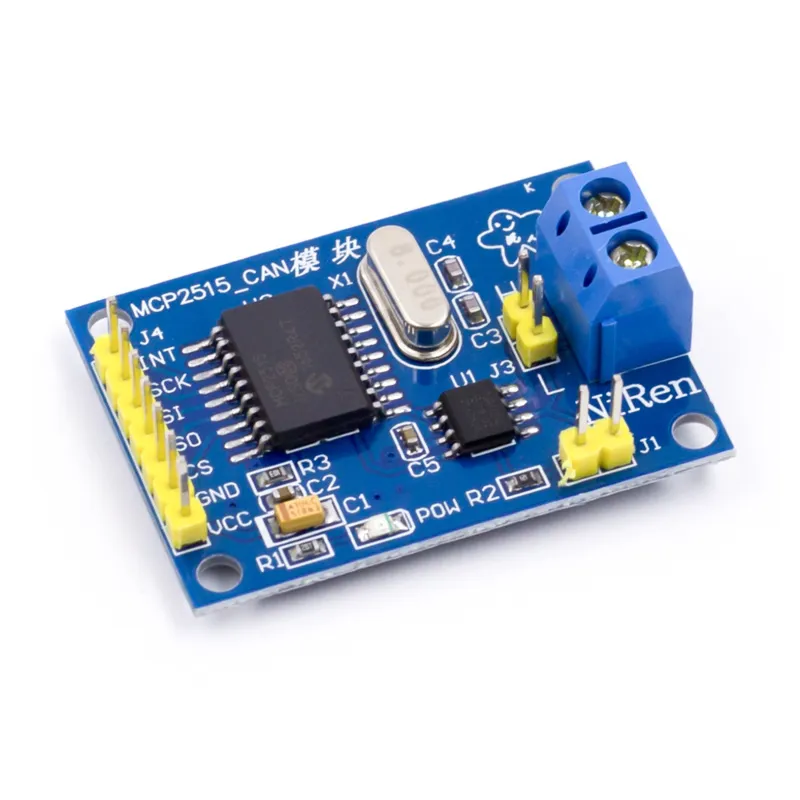
Η μονάδα CAN-bus MCP2515 είναι κατάλληλη για Arduino και άλλα έργα μικροελεγκτών, όπου θέλετε να επικοινωνήσετε με ένα σύστημα CAN-bus μέσω του πρωτοκόλλου SPI.
Υποστηρίζει CAN V2.0B με ταχύτητα επικοινωνίας 1 Mb/s.
Τάση τροφοδοσίας: 5V
Διεπαφή: ελέγχεται με SPI
Διαστάσεις: περίπου 2,8 x 4,8 cm
Διαστάσεις
Μήκος: 4cm
Πλάτος: 2,8cm
Ύψος: 1,2cm
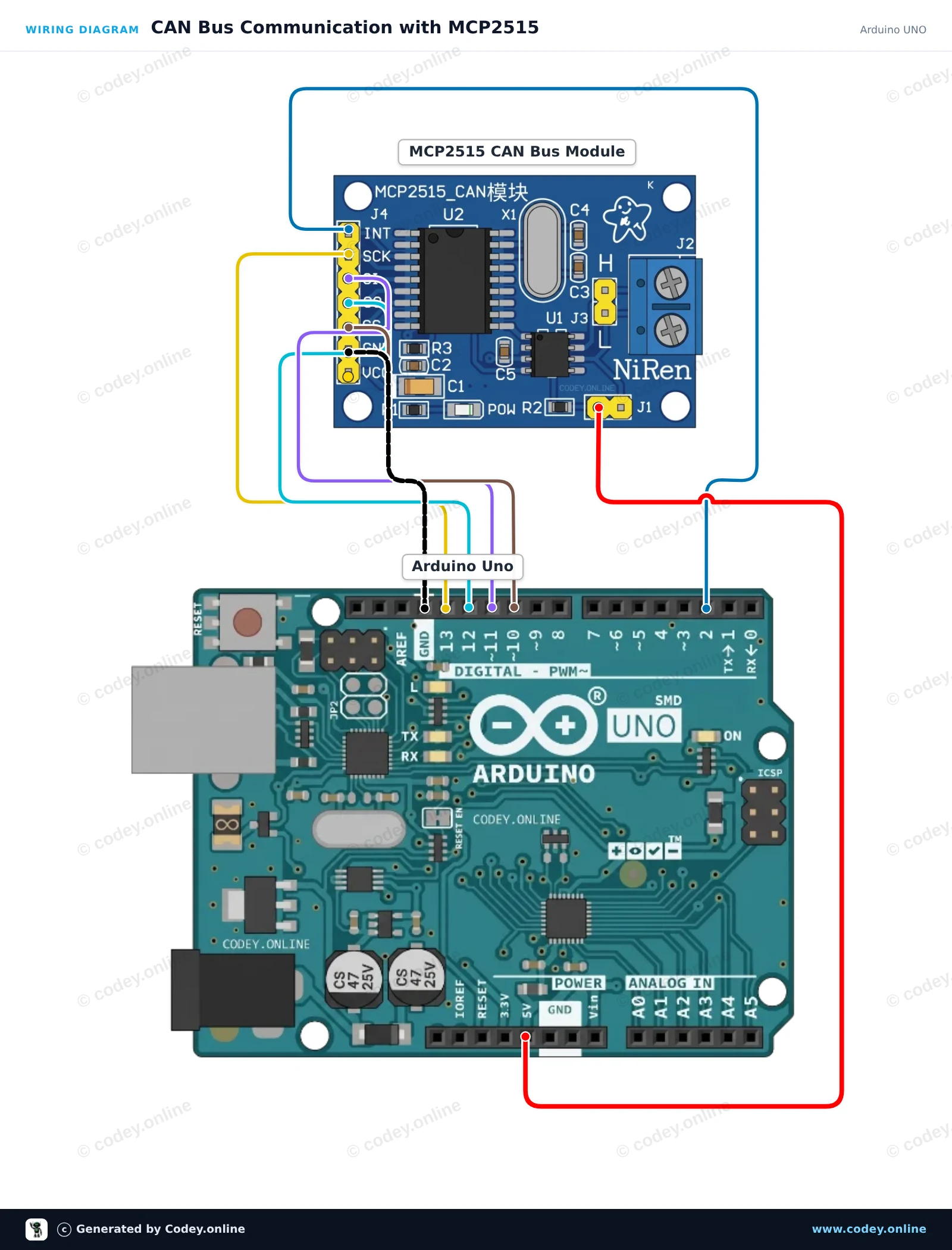
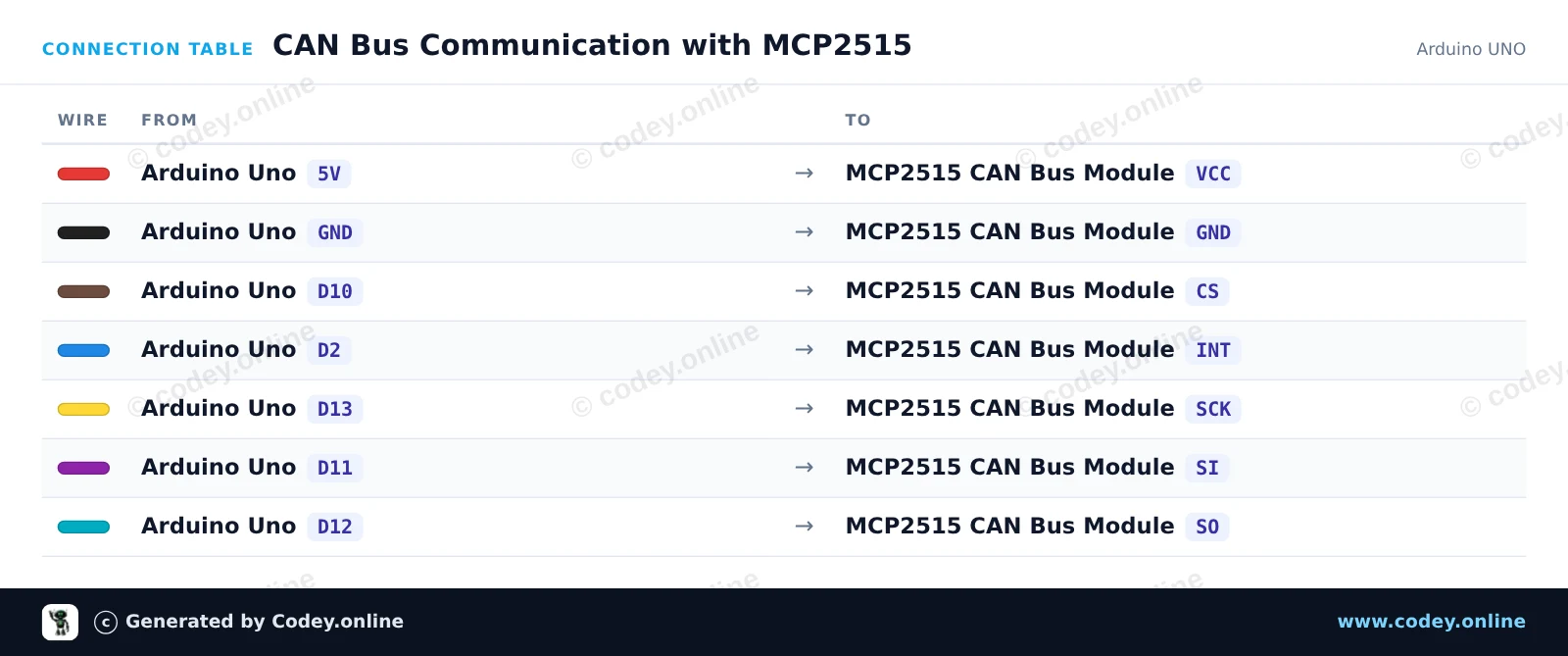
Έτσι συνδέεις το Μονάδα CAN-bus MCP2515 SPI 5V σε ένα Arduino UNO ή ESP32, με ένα παράδειγμα sketch που μπορείς να ανεβάσεις αμέσως.
Συνδέει ένα module διαύλου CAN MCP2515 σε ένα Arduino Uno χρησιμοποιώντας hardware SPI. Το sketch αρχικοποιεί τον CAN controller στα 500 kbps, στέλνει ένα δοκιμαστικό μήνυμα CAN κάθε 2 seconds και εμφανίζει όλα τα ληφθέντα frames στο Serial Monitor.
/*
 * ==================================================================
 *  Generated by Codey.online  —  https://www.codey.online
 * ==================================================================
 *  Project   : CAN Bus Communication with MCP2515
 *  Board     : Arduino UNO (arduino:avr:uno)
 *  Parts     : CAN-bus module MCP2515 SPI 5V
 *  Libraries : mcp_can 1.5.1
 *
 *  Codey Online is an AI-powered browser IDE for Arduino and ESP32.
 *  Describe your project and Codey writes the code, draws the wiring
 *  diagram and uploads it to your board, straight from the browser.
 *  This code is free to use, modify and share, without warranty.
 * ==================================================================
 */

#include <SPI.h>
#include <mcp_can.h>

const byte CAN_CS_PIN = 10;
const byte CAN_INT_PIN = 2;

MCP_CAN CAN(CAN_CS_PIN);

unsigned long lastSend = 0;

void setup() {
  Serial.begin(115200);
  pinMode(CAN_INT_PIN, INPUT);

  // Initialize MCP2515 with standard 8MHz crystal at 500 kbps
  if (CAN.begin(MCP_ANY, CAN_500KBPS, MCP_8MHZ) == CAN_OK) {
    Serial.println(F("MCP2515 initialized successfully!"));
  } else {
    Serial.println(F("MCP2515 initialization failed!"));
    while (1);
  }

  CAN.setMode(MCP_NORMAL);
  Serial.println(F("CAN controller ready in normal mode."));
}

void loop() {
  // Check for received CAN messages
  if (CAN.checkReceive() == CAN_MSGAVAIL) {
    unsigned long rxId;
    byte len = 0;
    byte rxBuf[8];

    CAN.readMsgBuf(&rxId, &len, rxBuf);

    Serial.print(F("RX -> ID: 0x"));
    Serial.print(rxId, HEX);
    Serial.print(F(" DLC: "));
    Serial.print(len);
    Serial.print(F(" Data: "));
    for (byte i = 0; i < len; i++) {
      if (rxBuf[i] < 0x10) Serial.print('0');
      Serial.print(rxBuf[i], HEX);
      Serial.print(' ');
    }
    Serial.println();
  }

  // Send a test packet every 2 seconds
  if (millis() - lastSend >= 2000) {
    lastSend = millis();
    byte txData[4] = {0xDE, 0xAD, 0xBE, 0xEF};
    byte sndStat = CAN.sendMsgBuf(0x100, 0, 4, txData);

    if (sndStat == CAN_OK) {
      Serial.println(F("TX -> Sent frame (ID: 0x100, Data: DE AD BE EF)"));
    } else {
      Serial.println(F("TX -> Error sending message"));
    }
  }
}Απαραίτητες βιβλιοθήκες: mcp_can 1.5.1
Wiring diagram and example code generated by Codey.online — https://www.codey.online
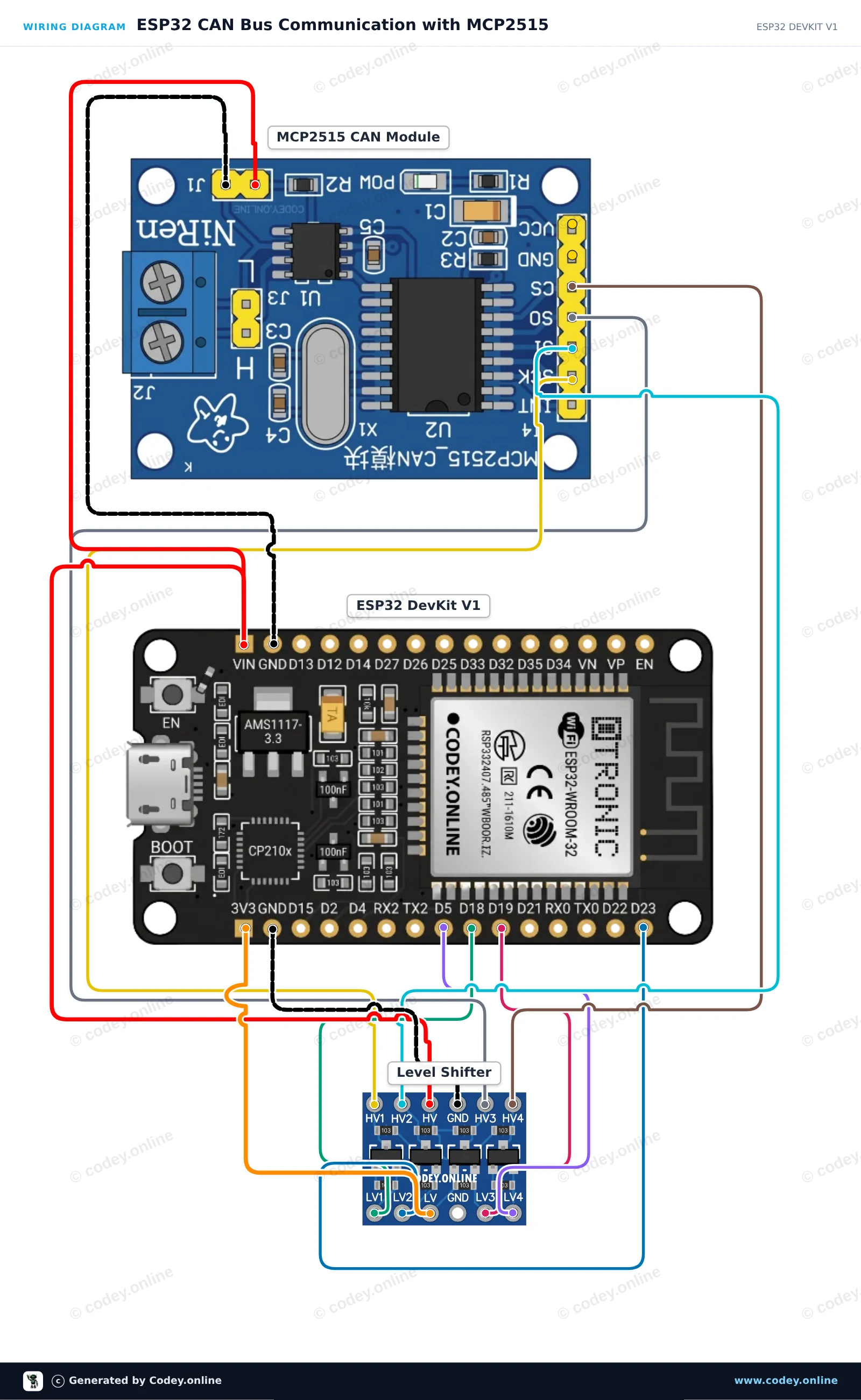
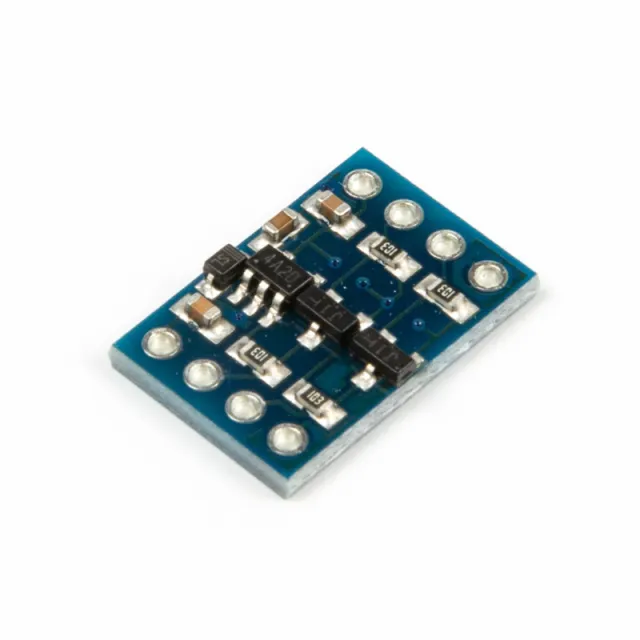
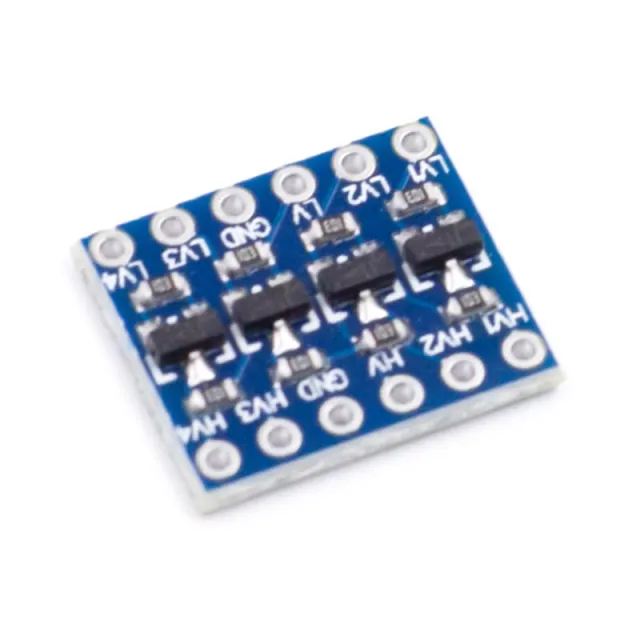
Αυτό το κύκλωμα συνδέει ένα ESP32 με ένα module CAN-bus MCP2515 μέσω SPI, χρησιμοποιώντας έναν αμφίδρομο level shifter 4 καναλιών για να προστατεύσει τη λογική 3.3V του ESP32 από το module 5V. Το sketch αρχικοποιεί τον ελεγκτή CAN στα 500 kbps, στέλνει ένα δοκιμαστικό CAN data frame κάθε δύο δευτερόλεπτα και εμφανίζει όλα τα ληφθέντα μηνύματα του CAN bus στο Serial Monitor.
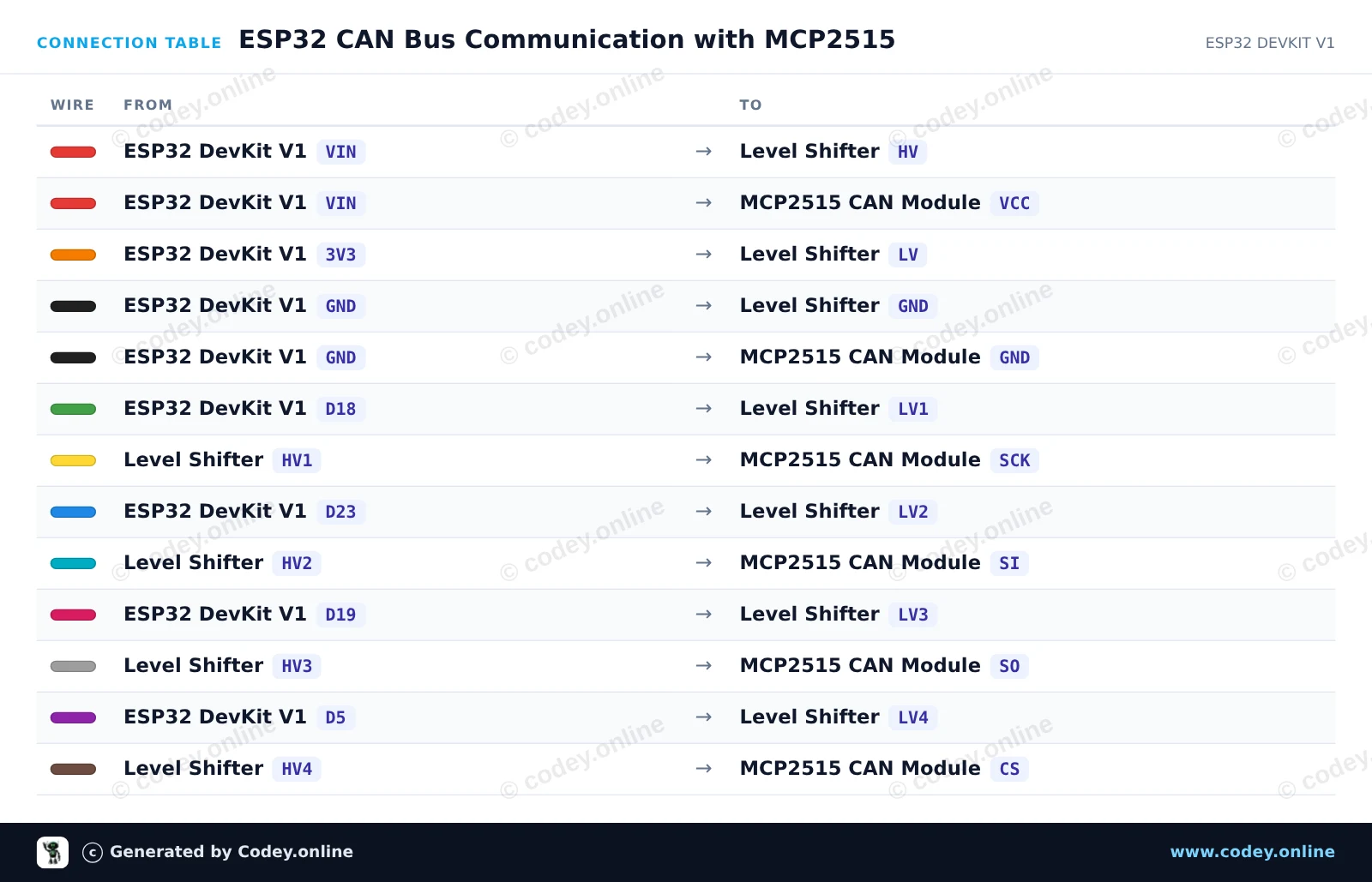
/*
 * ==================================================================
 *  Generated by Codey.online  —  https://www.codey.online
 * ==================================================================
 *  Project   : ESP32 CAN Bus Communication with MCP2515
 *  Board     : ESP32 DEVKIT V1 (esp32:esp32:esp32doit-devkit-v1)
 *  Parts     : CAN-bus module MCP2515 SPI 5V
 *  Libraries : mcp_can 1.5.1
 *
 *  Codey Online is an AI-powered browser IDE for Arduino and ESP32.
 *  Describe your project and Codey writes the code, draws the wiring
 *  diagram and uploads it to your board, straight from the browser.
 *  This code is free to use, modify and share, without warranty.
 * ==================================================================
 */

#include <SPI.h>
#include <mcp_can.h>

const int CAN_CS_PIN = 5;
MCP_CAN CAN0(CAN_CS_PIN);

void setup() {
  Serial.begin(115200);
  while (!Serial);

  // Initialize MCP2515 running at 8MHz clock and 500kbps CAN baud rate
  if (CAN0.begin(MCP_ANY, CAN_500KBPS, MCP_8MHZ) == CAN_OK) {
    Serial.println("MCP2515 Initialized Successfully!");
  } else {
    Serial.println("Error Initializing MCP2515...");
  }

  CAN0.setMode(MCP_NORMAL);
}

void loop() {
  // Prepare sample data payload (8 bytes)
  byte data[8] = {0x11, 0x22, 0x33, 0x44, 0x55, 0x66, 0x77, 0x88};

  // Send CAN message with standard ID 0x100
  byte sndStat = CAN0.sendMsgBuf(0x100, 0, 8, data);
  if (sndStat == CAN_OK) {
    Serial.println("CAN Message Sent Successfully!");
  } else {
    Serial.println("Error Sending CAN Message...");
  }

  // Check for incoming CAN messages
  if (CAN0.checkReceive() == CAN_MSGAVAIL) {
    long unsigned int rxId;
    unsigned char len = 0;
    unsigned char rxBuf[8];

    CAN0.readMsgBuf(&rxId, &len, rxBuf);

    Serial.print("Received ID: 0x");
    Serial.print(rxId, HEX);
    Serial.print(" Data: ");
    for (byte i = 0; i < len; i++) {
      Serial.print("0x");
      if (rxBuf[i] < 0x10) Serial.print("0");
      Serial.print(rxBuf[i], HEX);
      Serial.print(" ");
    }
    Serial.println();
  }

  delay(2000);
}Απαραίτητες βιβλιοθήκες: mcp_can 1.5.1
Wiring diagram and example code generated by Codey.online — https://www.codey.online





 English
  Nederlands
  Frans
Frans  Deutsch
  Italiano
  Español
  Suomi
Suomi  Polski
  Dansk
Dansk  Български
  Čeština
  Hrvatski
  Svenska
  Aileen