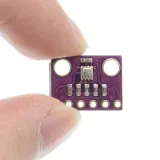
SKU: OT711-D64 Αριθμός είδους: NB078 EAN: 4184669585804

ΠΡΟΣΟΧΗ έκδοση 3.3V. Κατάλληλο για ESP8266, ESP32, Wemos D1 κ.λπ.
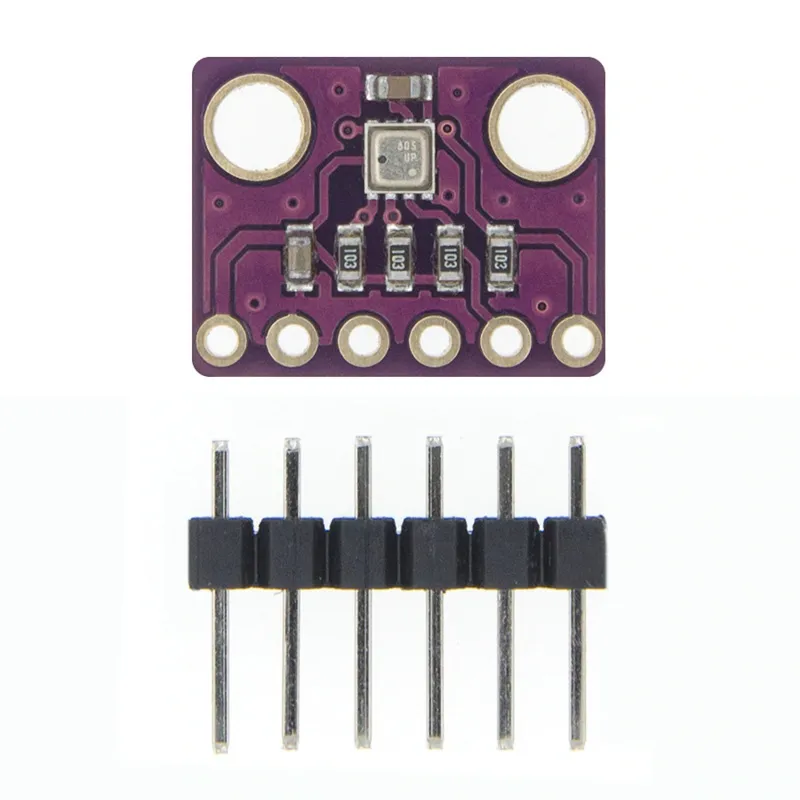
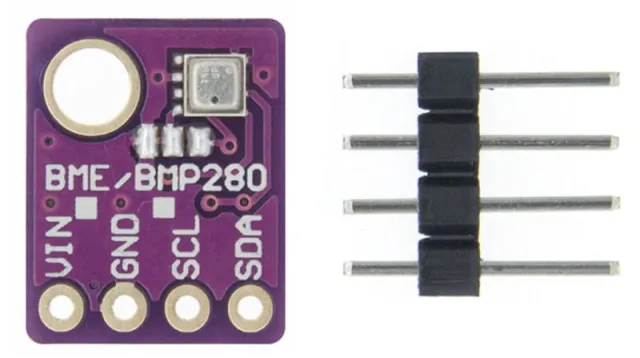
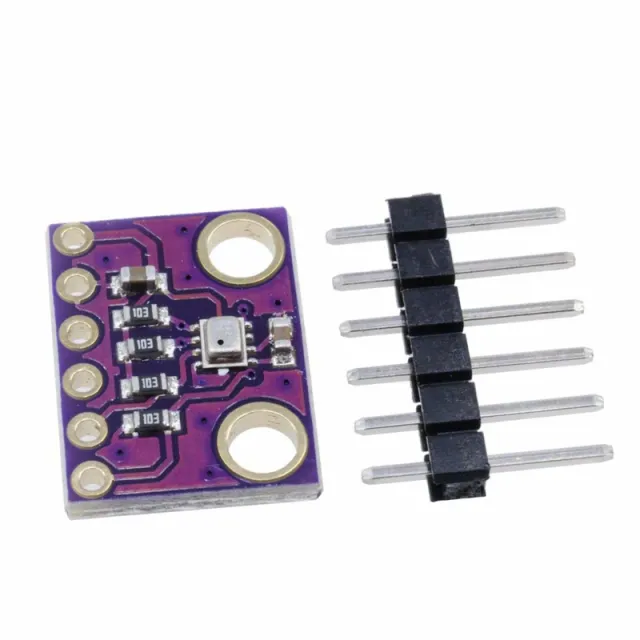
Το GY-BME280 είναι ένα Breakout Board με αισθητήρα Bosch Sensortec ME280 για Θερμοκρασία, Υγρασία και Ατμοσφαιρική Πίεση.
Η πλακέτα διαθέτει επιλέξιμη διεύθυνση I2C (γέφυρα συγκόλλησης GS2)
- Αντιστάσεις pull-up I2C
- Περιλαμβάνει 7 pin header 2.54mm
- δύο οπές στερέωσης 3.5mm.
Χαρακτηριστικά BME280
- Μάρκα αισθητήρα: Bosch
- Μέγεθος αισθητήρα 2.5mm x 2.5mm x 0.93mm μεταλλικό καπάκι LGA
- Ψηφιακή διεπαφή I2C (έως 3.4 MHz) και SPI (3 και 4 καλωδίων, έως 10 MHz)
- Τάση τροφοδοσίας: 3V έως 3.6 V
- Κατανάλωση ρεύματος 1.8 uA @ 1Hz υγρασία και θερμοκρασία, 2.8 uA @ 1Hz πίεση και θερμοκρασία. 3.6 uA @ 1Hz υγρασία, πίεση και θερμοκρασία και 0.1 uA σε κατάσταση αναμονής
- Εύρος αισθητήρα θερμοκρασίας -40 / +85 C,
- Εύρος υγρασίας; 0 - 100% σχετ. Υγρασία
- Εύρος ατμοσφαιρικής πίεσης: 300- 1100 hPa
- Τόσο I2C όσο και SPI
Διαστάσεις
Μήκος: 1,47cm
Πλάτος: 1,14cm
Ύψος: 0,23cm
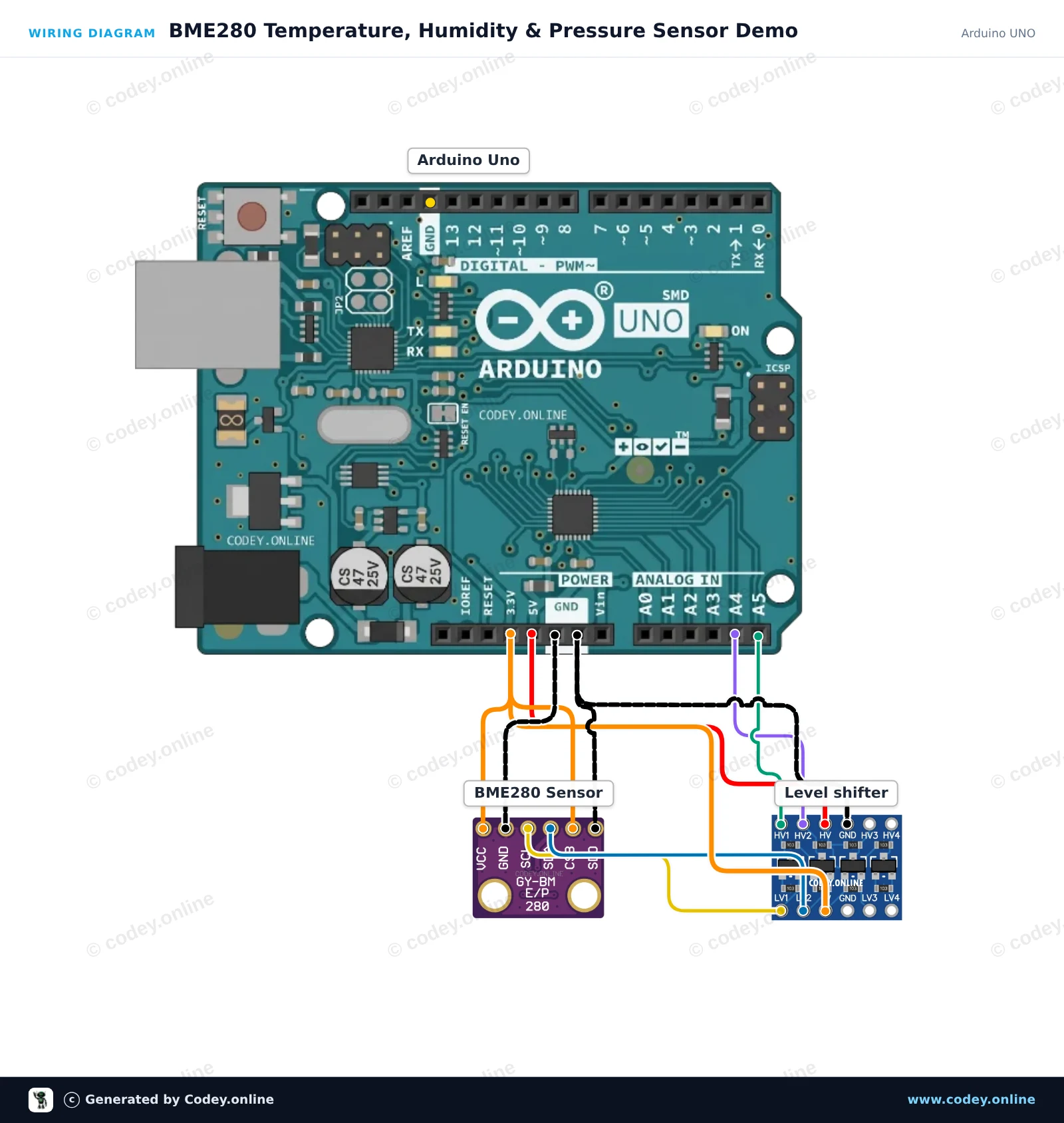
Έτσι συνδέεις το Αισθητήρας 3-σε-1 Θερμοκρασία Υγρασία και Ατμοσφαιρική Πίεση | 3.3V | I2C και SPI | Bosch BME280 σε ένα Arduino UNO ή ESP32, με ένα παράδειγμα sketch που μπορείς να ανεβάσεις αμέσως.
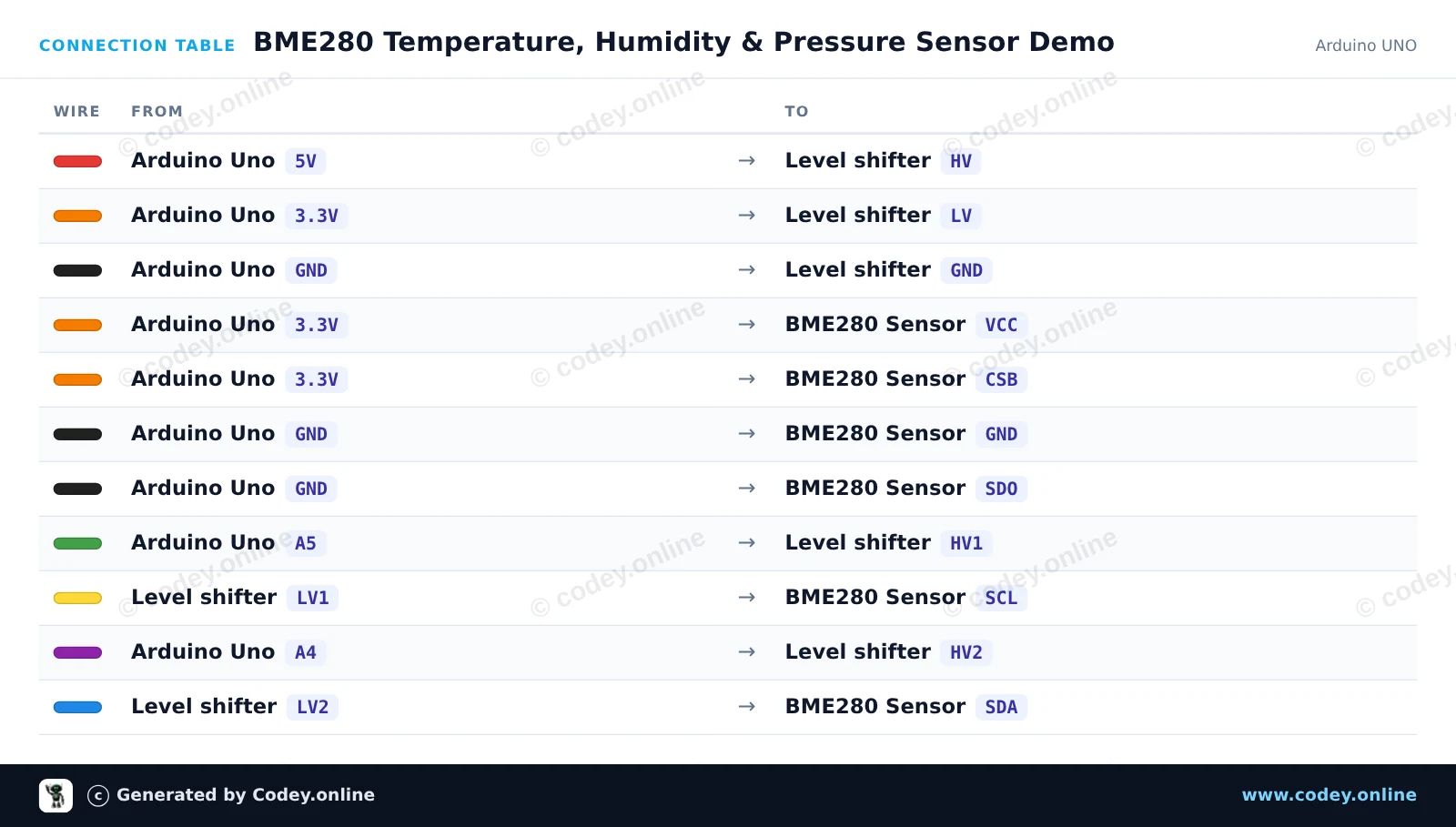
Αυτό το έργο διαβάζει τη θερμοκρασία περιβάλλοντος, τη σχετική υγρασία και την ατμοσφαιρική πίεση χρησιμοποιώντας έναν αισθητήρα BME280 3.3V συνδεδεμένο σε ένα Arduino Uno. Ένας αμφίδρομος logic level shifter 4 καναλιών μετατρέπει με ασφάλεια τα σήματα I2C 5V σε 3.3V. Οι μετρήσεις του αισθητήρα εμφανίζονται στο Serial Monitor κάθε δύο δευτερόλεπτα.
/*
 * ==================================================================
 *  Generated by Codey.online  —  https://www.codey.online
 * ==================================================================
 *  Project   : BME280 Temperature, Humidity & Pressure Sensor Demo
 *  Board     : Arduino UNO (arduino:avr:uno)
 *  Parts     : Bosch BME280 3.3v 3-in-1 sensor Temperature Humidity and Air Pressure
 *  Libraries : Adafruit BME280 Library 2.3.0, Adafruit Unified Sensor 1.1.15
 *
 *  Codey Online is an AI-powered browser IDE for Arduino and ESP32.
 *  Describe your project and Codey writes the code, draws the wiring
 *  diagram and uploads it to your board, straight from the browser.
 *  This code is free to use, modify and share, without warranty.
 * ==================================================================
 */

#include <Wire.h>
#include <Adafruit_Sensor.h>
#include <Adafruit_BME280.h>

Adafruit_BME280 bme;

void setup() {
  Serial.begin(115200);
  while (!Serial) delay(10);

  Serial.println(F("Initializing BME280 sensor..."));

  // SDO tied to GND sets address to 0x76
  if (!bme.begin(0x76, &Wire)) {
    Serial.println(F("Could not find BME280 sensor. Check wiring!"));
    while (1) delay(100);
  }

  Serial.println(F("BME280 sensor ready!"));
}

void loop() {
  float temperature = bme.readTemperature();
  float humidity = bme.readHumidity();
  float pressure = bme.readPressure() / 100.0F; // Convert Pa to hPa

  Serial.print(F("Temperature: "));
  Serial.print(temperature, 1);
  Serial.print(F(" °C | Humidity: "));
  Serial.print(humidity, 1);
  Serial.print(F(" % | Pressure: "));
  Serial.print(pressure, 1);
  Serial.println(F(" hPa"));

  delay(2000);
}Απαραίτητες βιβλιοθήκες: Adafruit BME280 Library 2.3.0, Adafruit Unified Sensor 1.1.15
Wiring diagram and example code generated by Codey.online — https://www.codey.online
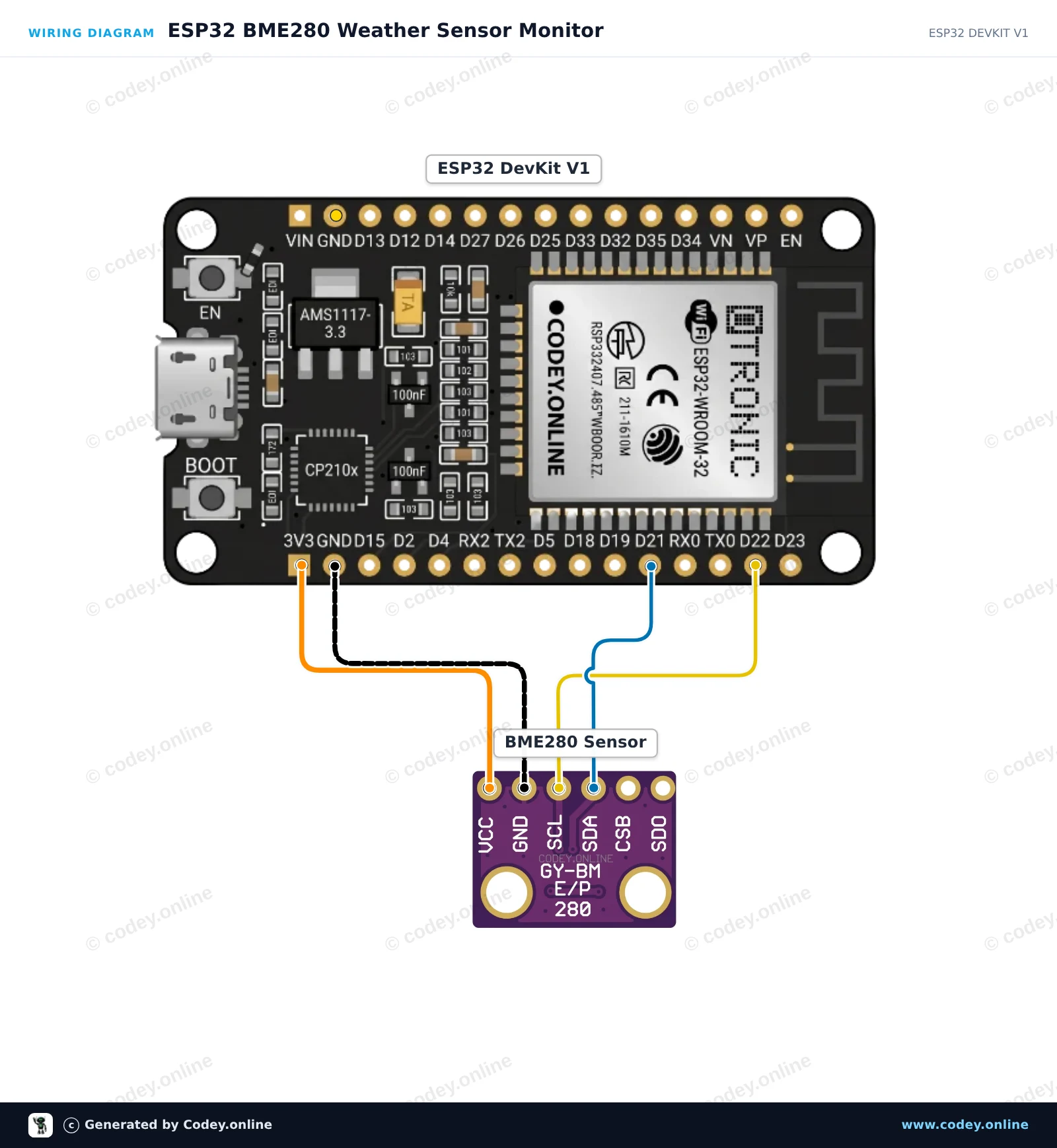
Αυτό το έργο διαβάζει τη θερμοκρασία περιβάλλοντος, τη σχετική υγρασία και την ατμοσφαιρική πίεση από τον αισθητήρα Bosch BME280 μέσω της διεπαφής I2C. Συνδέστε τον αισθητήρα 3.3V απευθείας στην τροφοδοσία του ESP32 και στα προεπιλεγμένα pin I2C (GPIO 21 και 22). Ανοίξτε το Serial Monitor στα 115200 baud για να δείτε μετρήσεις περιβάλλοντος σε πραγματικό χρόνο που ενημερώνονται κάθε δύο δευτερόλεπτα.
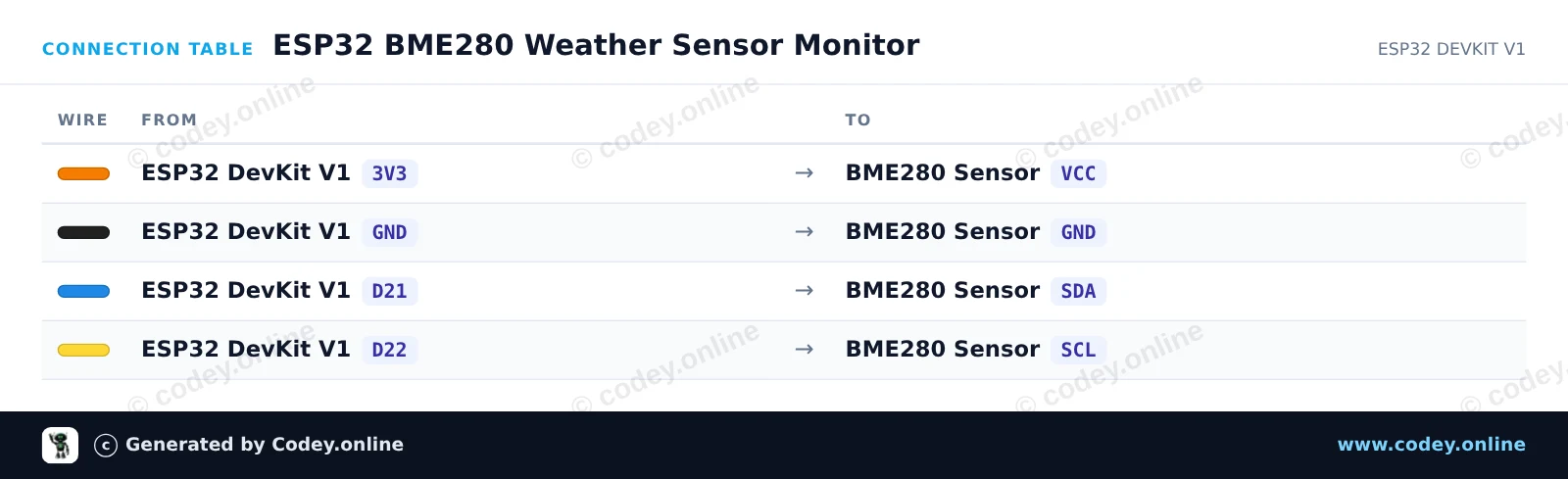
/*
 * ==================================================================
 *  Generated by Codey.online  —  https://www.codey.online
 * ==================================================================
 *  Project   : ESP32 BME280 Weather Sensor Monitor
 *  Board     : ESP32 DEVKIT V1 (esp32:esp32:esp32doit-devkit-v1)
 *  Parts     : Bosch BME280 3.3v 3-in-1 sensor Temperature Humidity and Air Pressure
 *  Libraries : Adafruit BME280 Library 2.3.0, Adafruit Unified Sensor 1.1.15
 *
 *  Codey Online is an AI-powered browser IDE for Arduino and ESP32.
 *  Describe your project and Codey writes the code, draws the wiring
 *  diagram and uploads it to your board, straight from the browser.
 *  This code is free to use, modify and share, without warranty.
 * ==================================================================
 */

#include <Wire.h>
#include <Adafruit_Sensor.h>
#include <Adafruit_BME280.h>

Adafruit_BME280 bme;

void setup() {
  Serial.begin(115200);
  while (!Serial) delay(10);

  Serial.println("Initializing BME280 sensor...");

  // Default I2C address is usually 0x76 or 0x77
  if (!bme.begin(0x76) && !bme.begin(0x77)) {
    Serial.println("Could not find a valid BME280 sensor! Check wiring.");
    while (1) delay(100);
  }

  Serial.println("BME280 initialized successfully.");
}

void loop() {
  float temperature = bme.readTemperature();
  float humidity = bme.readHumidity();
  float pressure = bme.readPressure() / 100.0F; // Convert Pa to hPa

  Serial.print("Temperature: ");
  Serial.print(temperature);
  Serial.println(" °C");

  Serial.print("Humidity:    ");
  Serial.print(humidity);
  Serial.println(" %");

  Serial.print("Pressure:    ");
  Serial.print(pressure);
  Serial.println(" hPa");

  Serial.println("------------------------");
  delay(2000);
}Απαραίτητες βιβλιοθήκες: Adafruit BME280 Library 2.3.0, Adafruit Unified Sensor 1.1.15
Wiring diagram and example code generated by Codey.online — https://www.codey.online





 English
  Nederlands
  Frans
Frans  Deutsch
  Italiano
  Español
  Suomi
Suomi  Polski
  Dansk
Dansk  Български
  Čeština
  Hrvatski
  Svenska
  Aileen